
With streaming services becoming the new norm for how many of us watch films and TV in 4K, it can be easy to forget that there is a way to enjoy your favourite content with even better picture and sound quality.
Enter 4K Blu-rays, which use a higher bitrate than streaming to create a better overall experience. But which player is best to take advantage of your high-resolution discs?
Sadly, the 4K Blu-ray player market can be best likened to a deserted town from a Western movie; it's tumbleweeds when it comes to new releases. Big hitters like Pioneer and Reavon both exited the market last year, and the biggest news recently when it comes to new player launches is Sony's "new" UBP-X700/K model, which appears to be the same as the best mid-range model on this list, just without any internet functionality.

But don't worry, there are still some top-notch models on the market. Panasonic and Sony are holding down the fort with a handful of excellent options, even if they are starting to show their age.
We have crafted a list of the best models right now, with various price points ranging from under £150 all the way up to just shy of £1000. Each entry has been thoroughly tested and reviewed by our expert team (you can find out how we test Blu-ray players here), and you can find full reviews attached to each.
With that out of the way, here are the best Blu-ray and 4K Blu-ray players on the market...
The quick list
Here's a quick breakdown of our picks for the best Blu-ray players with a short summary and some of the key features that they individually offer. If you're after more details, click the image of the streaming service to drop down to the in-depth entry.

The best overall
If you’ve bought into the 4K Blu-ray format and have a suitable home cinema set-up, you need a dedicated player that can deliver on multiple fronts. The Panasonic DP-UB820 is just that, supporting all major HDR formats, delivering a hugely immersive and impactful picture, backed up by a strong audio performance.

The best cheap
The Panasonic DP-UB150EB might lack the nuance and sophistication of more premium 4K Blu-ray players but, for the money, it still makes an excellent case for itself. It's certainly a big step up from streaming and will reward those prepared to make the effort and stick with physical media.

The best affordable
The X700 is a fantastic player that makes watching 4K discs an affordable reality. It may not exude the same sensation of premium quality as its older sibling, but the fact that it can deliver a subtler, more lifelike 4K picture on a tighter budget is remarkable.

The best non-4k
Overall, the BDT180EB is a very competitive product, offering a quality picture at a low price point that will be at home on screens of any type and size. Whether it’s DVD, Blu-ray or video streaming, this player can handle them all.

28th January 2026: Checked availability of all models and updated entries. 26th August 2025: No new entries on the list; however, we've refreshed the page to ensure our guidance remains up to date and correct. April 2025: No new models added to our list, though Sony has officially unveiled a "new" Blu-ray player, which is an updated version of the UBP-X700; we hope to review this model soon.

I'm a staff writer here at What Hi-Fi? that happens to be a huge fan of physical media. I've been growing my personal collection of Blu-rays for many years now and have been following the latest trends and developments in the world of 4K Blu-rays closely since I joined What Hi-Fi? in 2022. I've been particularly vocal about my concerns with the declining interest in the format, urging people to buy physical copies of their favourite films while they still can.
Best overall


With the DP-UB820EB, Panasonic has taken the video processing tech out of the flagship DP-UB9000 – which features further down this list – and placed it in a more affordable package. And the results are sensational. The player serves up a wonderfully inviting and immersive picture, bursting with colour and detail. It also produces a meaty and exciting sound, which complements the picture perfectly.
All the main flavours of HDR are supported, including HDR10, HDR10+ and Dolby Vision, which means you can extract the most from 4K content. It's a very good upscaler too, so normal Blu-rays should look the part on your shiny new 4K TV. For the money, you'll struggle to find a better all-round machine, which is why we've placed this What Hi-Fi? Award-winner at the top of our list of the best Blu-ray players.
Read the full review: Panasonic DP-UB820EB
Picture | Vibrant, immersive HDR picture | ★★★★★ |
Sound | Powerful and weighty sound | ★★★★★ |
Features | No surprises, but ticks main boxes | ★★★★☆ |
Best cheap


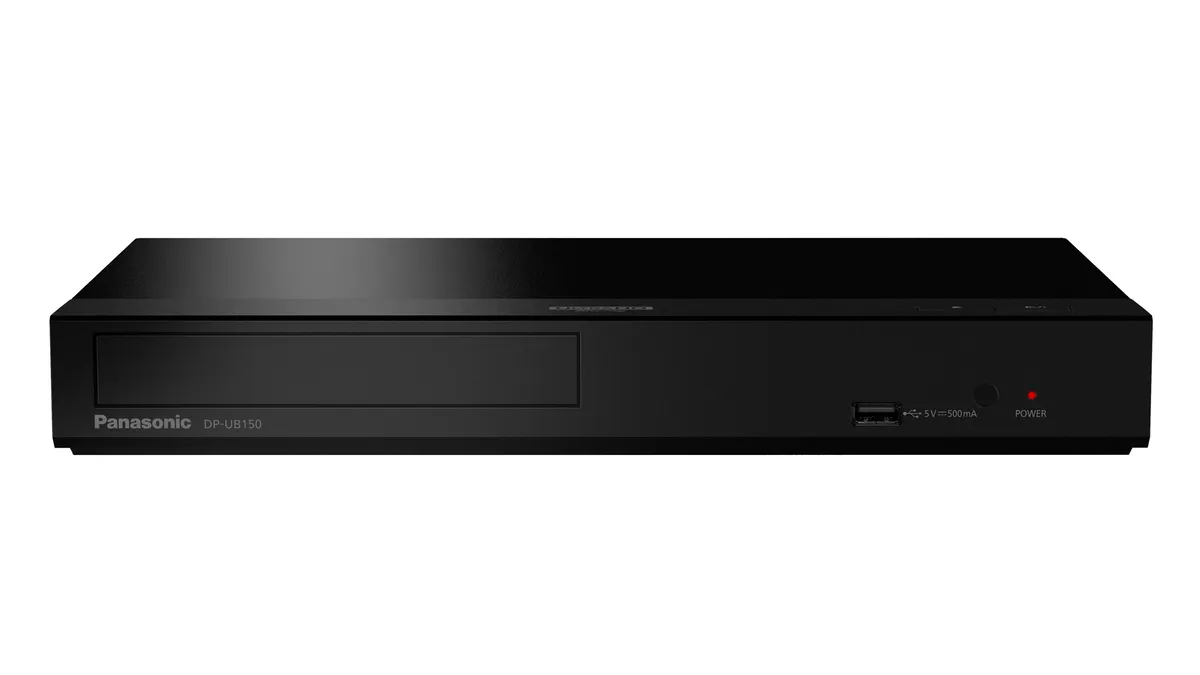
This Panasonic 4K player represents great value for money. Feature-wise, it's a little sparse – the main one missing is Dolby Vision support, which could put some buyers off. But it's the performance that matters, and on that front it delivers. It can provide 7.1 surround sound (using a supported system), and the audio is nicely detailed, with an impressive sense of scale. There's a lot to admire when it comes to picture quality too - dark details are easily strong enough, while it handles 4K upscaling with aplomb. A great buy for those working on a tight budget.
Read the full review: Panasonic DP-UB150EB
Pictures | Punchy, vivid picture | ★★★★★ |
Sound | Big, impactful sound | ★★★★★ |
Features | Good for the money | ★★★★☆ |
Best mid-range


If you want an affordable route into the world of 4K Blu-ray players, the Sony UBP-X700 is a great option. It's one of the most talented 4K players we've seen at this kind of money. It’s a fun, involving performance - pictures are stacked with detail. The Sony displays a wonderfully subtle picture that’s impeccably judged while being hugely entertaining. Sound quality is equally stirring with its zippy, dynamic character complementing that class-leading picture.
The Sony ticks most of the boxes you'd expect a player to at this price, and includes both Dolby Vision and HDR10 support but no HDR10+.
Despite not flashing the hi-res audio badge, the X700 can also play up to 24bit/192kHz files and supports a number of formats, including WAV, FLAC and DSD. There's also smart functionality and twin HDMI outputs. This Sony machine is good enough to boost all manner of home cinema systems, so you can buy with confidence.
Read the full review: Sony UBP-X700
Attributes | Notes | Rating |
|---|---|---|
Picture | Crisp, natural-looking picture | ★★★★★ |
Sound | Sound could be punchier and grander | ★★★★★ |
Features | Good features and connectivity options | ★★★★★ |
Best non-4k


Making a Blu-ray player for such a low price is no easy feat. Making a good Blu-ray player at this level is more difficult, and a great one harder still. But somehow Panasonic has managed it with the DMP-BDT180EB. If you can live without the 4K Blu-ray playback, the Panasonic is perfect for any entry-level home cinema set-up. Detail levels, colour balance and motion handling are all excellent for the money.
It doesn’t hold back when it comes to audio quality either. Its dynamic delivery is exciting to listen to, voices sound clear and the whole presentation is pretty balanced. If you want a solid upgrade on an old DVD spinner, this Panasonic Blu-ray player won't let you down.
Read the full review: Panasonic DMP-BDT180EB
Attributes | Notes | Rating |
|---|---|---|
Picture | Sharp details and vibrant picture | ★★★★★ |
Sound | Dynamic, full sound | ★★★★★ |
Features | Small remote and no wi-fi | ★★★★☆ |
Best high end


There are some great budget 4K Blu-ray players in this list, but the Panasonic DP-UB9000 is the one to audition if you're in the market for a premium machine.
Its menu system is a little overcomplicated, but once you've got the Panasonic set up for your particular display, it serves up an entertaining and attention-grabbing image, bursting with colour. There's a great sense of depth and realism to 4K images that makes you sit up and take notice.
Soundtracks are delivered with plenty of weight and power, which is just what you want from a premium player like this. The provision of a 7.1 multi-channel analogue is great news for owners of legacy AV receivers, while the choice of either balanced XLR or unbalanced RCA connections for stereo playback and the provision of support for WAV, FLAC, AIFF and AAC audio formats shows this player means business.
Read the full review: Panasonic DP-UB9000
Attributes | Notes | Rating |
|---|---|---|
Picture | Excellent colour balance and sense of realism | ★★★★★ |
Sound | Solid, powerful sound | ★★★★★ |
Features | Menu options can be confusing | ★★★★☆ |
How to choose
How to choose the best Blu-ray player for you
Why you can trust What Hi-Fi? Our expert team reviews products in dedicated test rooms, to help you make the best choice for your budget. Find out more about how we test.
As filming technology advances with increasingly impressive stunts, sets, and graphics, filmed at ever-higher resolutions and frame rates, 4K Blu-rays really let you appreciate the artistry of today's filmmakers with sharp details, seamless motion and rich colours.
To make the most of a 4K Blu-ray player you'll need to pair it with a 4K TV or projector and for top-notch visuals look out for which HDR formats are supported such as Dolby Vision and HDR10+.
4K Blu-ray players not only enhance your viewing experience, but they can also support lossless object-based surround formats such as Dolby Atmos and DTS:X. But you'll need to partner it with either a compatible sound system and AVR or a soundbar capable of outputting immersive audio.
4K players are backwards compatible so you can play normal Blu-rays and DVDs without issue, though if this is something you're likely to do frequently pay close attention to a model's upscaling abilities. Some 4K players are also universal decks that can play more niche audio disc formats such as SACD and DVD-Audio.
Almost all players have Ethernet ports for a wired network connection and a large number even have wireless built-in and USB ports that you can use to access an external hard drive. Expect to find HDMI outputs as standard on modern players and, for flexibility, many Blu-ray players have an additional audio-only output.
Our list of the best 4K Blu-ray players only contains models reviewed by our test team in our dedicated test rooms. Each model has been through our rigorous testing process so you can be 100% confident that they all serve up brilliant pictures and sound at their respective price points.
Also consider
Sony PlayStation 5: Chances are, if you're a console gamer you'll already have one of these. The PS5 is a very capable 4K Blu-ray player, with features such as Dolby Atmos and HDR10 playback both supported. Unlike its Xbox counterpart, it doesn't feature Dolby Vision which is a bit of a shame, but considering it's half the price of the premium Panaosnic and has the ability to stream and play games, its certainly a solid deal.
Microsoft Xbox Series X: An alternative option to the above choice, the Xbox Series X does much of what the PS5 does but with the added benefit of Dolby Vision. The Xbox also seems to have more picture and sound settings to tweak, making it the better console for those who like the squeeze out the very best AV experience from their console.
Reavon UBR-X100: It's pricey, but this enthusiast level 4K media player is a solid choice for those who want to try something new. Featuring excellent picture quality and detailed sound, the Reavon is an impressive piece of kit. However, it skips out on HDR10+, so we'd recommend giving it a miss if you own a Samsung TV.
How we test
How we test blu-ray players
Here at What Hi-Fi? we review hundreds of products every year, from TVs to speakers, headphones to hi-fi systems. So how do we come to our review verdicts? And why can you trust them? Allow us to explain.
The What Hi-Fi? team has more than 100 years of experience in reviewing, testing and writing about consumer electronics. We have state-of-the-art testing facilities in London and Bath, where our team of expert reviewers do all our in-house testing. This gives us complete control over the testing process, ensuring consistency.
This includes a dedicated home cinema room where we spend plenty of time with every Blu-ray player that passes through our doors. When testing picture quality we try players with reference TVs and projectors trying a wide range of content, including SDR and HDR.
To assess sound quality, we connect them up to our reference AV receiver and surround sound package so we can hear just what they're capable of. We'll also use the player with a more price-comparable system to see how it works with electronics and speakers that would be a better fit price-wise.
We also compare 4K Blu-ray players with rival products in the same category, and the current class-leaders to see where they sit in the current market and to help us decide where they should feature in this buying guide.
All review verdicts are agreed upon by the team as a whole rather than a single reviewer, helping to ensure consistency and avoid individual subjectivity. That's why our reviews are trusted by retailers and manufacturers as well as consumers.
F.A.Q
Is Blu-ray a dying format?
Despite Sony announcing it will end production of recordable Blu-ray discs earlier this year the format is still alive and well.
Movie studios are still releasing new movies on 4K Blu-ray and many big name directors, including Christopher Nolan continue to support it, urging fans to buy discs rather than simply stream their works.
On top of that there have even been some reports suggesting Blu-ray sales have been on the up recently in certain markets – though prior to this the number of sales were undeniably going in the other direction.
Sony has also helped add to Blu-ray’s longevity announcing it will launch a new UBP-X700/K player in the near future.
What are the benefits of 4K Blu-ray over streaming?
Stick with discs or switch to streaming?
While we can't deny that streaming is more convenient and often more cost-effective, there are a handful of serious drawbacks that keep us firmly grasping our players and discs.
Buying your favourite movie on 4K Blu-ray means you'll be getting the highest bitrate playback, meaning that picture and sound quality will trump anything that streaming services can offer. There are services out there that boast high-bitrate streaming (such as Sony's Picture Core service), but they are few and far between.
You also won't have to worry about your favourite content disappearing from your library, as streaming services often rotate content libraries based on contractual agreements. Once you own a movie on Blu-ray, it's yours.
While streaming is usually more cost-effective, we can't ignore the ongoing trend of rising subscription prices. Netflix, for example, has raised the price of its 4K HDR tier a handful of times in just the last year. 4K Blu-rays aren't cheap, but if you're paying for three or more streaming subscriptions monthly, then we'd hazard a guess that the price disparity isn't huge.
Do I need a specific TV to watch 4K Blu-rays?
The player isn't the only equipment you'll need.
If you want to get the most out of your 4K disc player, then you'll need a good TV. Most TVs on the market are 4K these days, and many include support for HDR in the HDR10+ and/or Dolby Vision formats. We're partial to OLED TVs, as in our experience they offer the best picture performance when it comes to contrast, colours and black depths, although QLED TVs are constantly evolving and improving. If you don't have a 4K TV already, then you won't see the benefit from this upgraded Blu-ray format.
To take advantage of the Dolby Atmos or DTS:X spatial audio tracks on your 4K Blu-rays, you'll want either a Dolby Atmos soundbar or a home theatre speaker package and AVR combo. We recommend the latter option as it provides the most cinematic sound.
You'll also want a high-speed HDMI capable; we know this might sound pedantic but trust us when we say it can make a difference. You don't need anything fancy, but the one that comes in the box with your Blu-ray player can easily be bettered.
Can I play regular Blu-rays in a 4K Blu-ray player and vice versa?
To put it simply, you're going to want a 4K Blu-ray player if you have a mixed collection of standard and 4K discs. A 4K Blu-ray player can play 4K discs and regular Blu-rays alike, making them the most versatile option. You cannot play a 4K Blu-ray in a non-4K player, so if you plan on buying the higher resolution discs then you should opt for one of the 4K models on this list.
MORE:
The very best films to showcase Dolby Vision performance
22 of the best film scenes to test Dolby Atmos
Our pick of the best home cinema deals
1080p vs 4K: how the screen resolutions differ
