
If streaming is your preferred way of listening to music, then you'll want to consider a music streamer in your hi-fi system.
These days, it's easier than ever to access and enjoy your favourite tunes in great audio quality, with most popular music streaming services offering millions of tracks in CD-quality and 24-bit hi-res.
Whether you use Qobuz or Tidal or have a NAS drive full of ripped CDs and downloaded hi-res files (or a combination of both), a music streamer – also called a network audio player – will deliver all your favourite and newly discovered songs in the best possible quality.
A music streamer delivers your digital music – whether that's via a streaming service or locally stored files – to your hi-fi over your home network, in the best sound quality possible. Network players these days also support the most popular music apps, internet radio and streaming methods (including AirPlay, Bluetooth, Google Cast), and even have multiple physical connections needed to create a versatile music hub.
The good news is, there is a wide range of models available for everyone's needs and budget. Compact, affordable streamers from WiiM, Cambridge Audio and Bluesound are rising in popularity, while more high-end models from Audiolab, Cyrus, Naim and Linn are available for audiophiles who crave every drop of authenticity and insight from their digital music library.
Every music streamer on this list has been tried and tested by What Hi-Fi?'s team of in-house expert reviewers in our dedicated listening rooms, so our top picks in this guide are a result of real-world use. You can read more about our music streamers testing process, or scroll down to see the best streamers we currently recommend.

I've been reviewing hi-fi and audio products at What Hi-Fi? for over 14 years. When testing and recommending the best network music streamers, I value excellent sound performance and look out for a seamless experience considering the numerous streaming methods and music services these multi-tasking products have to juggle. During testing, I put particular focus on how user-friendly the streamer and accompanying app are, and make sure there are no dropouts in the wi-fi or hiccups when streaming. My top picks in this list range from the affordable to the high-end, and all have passed these crucial tests to deliver the best performance expected at their price point.
10th March 2026: We've added the excellent Bluesound Node Icon and Arcam ST25 streamers into the main list following their recent What Hi-Fi? Award wins, while the Also Consider list has been updated with Cambridge and Audiolab alternatives.
Best music streamer overall
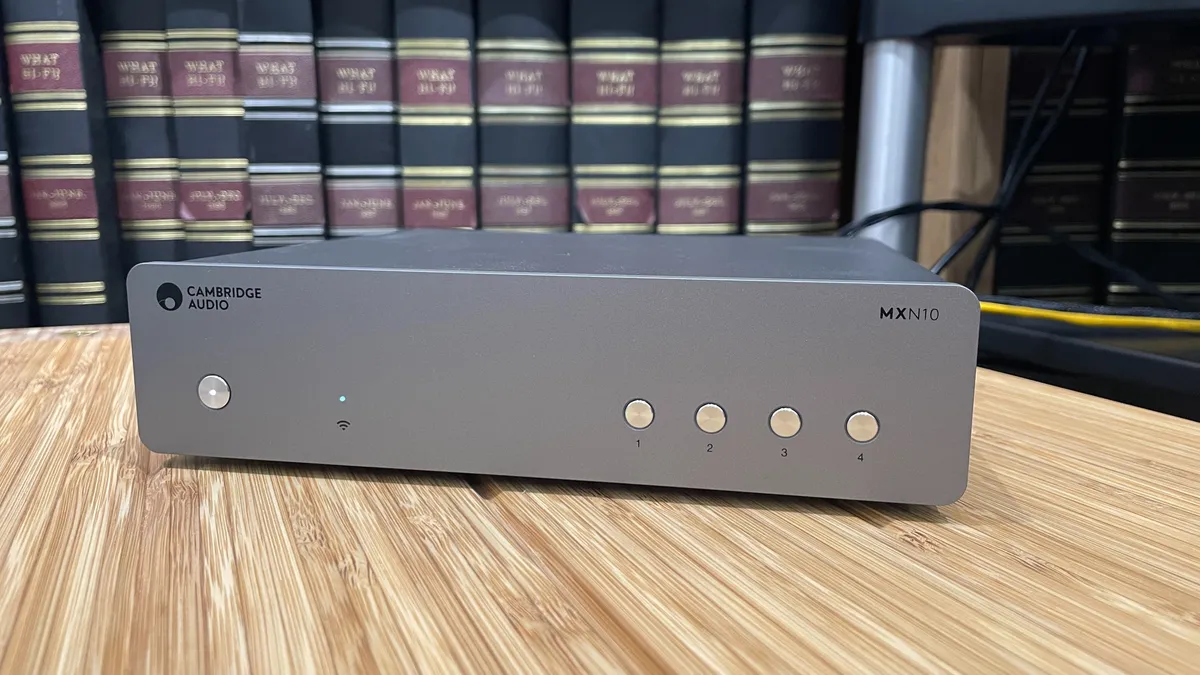


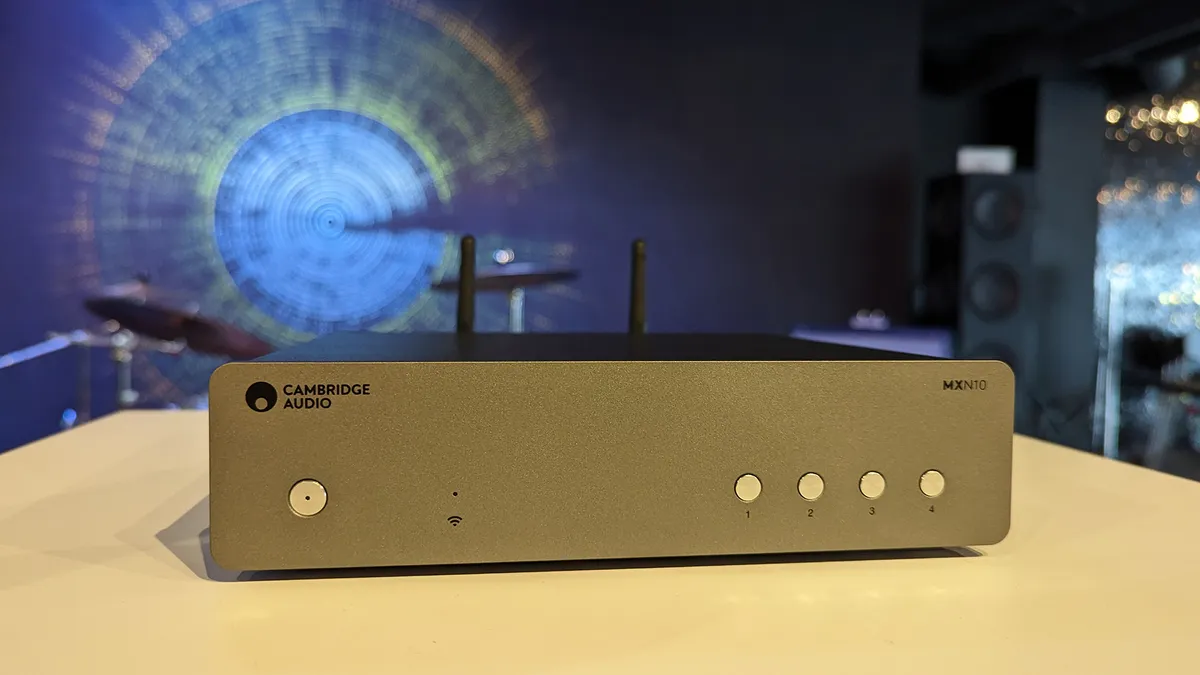

Until we reviewed the WiiM Pro Plus (below), the Cambridge Audio MXN10 was the most affordable music streamer to pass our test rooms. It still remains great value, however, and delivers so much performance out of its dinky stature, for what we think is still an affordable, entry-level price tag to the world of music streaming.
The minimalist streamer doesn’t come with a remote, nor are many physical connections on the back – an RCA line level analogue output, one coaxial and one optical are all you get – yet this tiny titan still offers everything you need by delivering truly five-star levels of performance.
Controlled via Cambridge Audio’s tidy StreamMagic app, the MXN10 hosts a plethora of streaming methods and services, including Google Chromecast, AirPlay 2, Spotify Connect, Tidal, Deezer, Qobuz and internet radio, as well as support for Bluetooth 5.0 and playback of files stored elsewhere on your local network. It's a breeze to use.
Effectively encompassing its older brother CXN (V2)'s performance on a smaller scale (in size and price), the MXN10 impressed us by delivering much of that musical cohesion and rhythmic and dynamic prowess we like so much in the CXN.
Compared with its former rival Bluesound Node (2021), the MXN10 adds a new layer of dynamic expression and rhythmic agility that sounds more authentic to the original song. Scale and authority are impressive from such a dinky device, while the tone and texture of instruments come to the fore with a great amount of detail. It's balanced and energetic, and turns its hand to every music genre we play through it.
The MXN remains our favourite music streamer at this level for offering greater insight and dynamic transparency. New competition arises in the form of the formidable WiiM Ultra (see below), which brings greater connectivity and a very modern, touchscreen-enabled design that is highly appealing for similar money.
The Ultra is a terrific all-rounder, but the MXN10 still pips it when it comes to absolute sound quality. Its musical performance is utterly charming and remains a favourite at this affordable price.
Read the full Cambridge Audio MXN10 review
Best budget music streamer
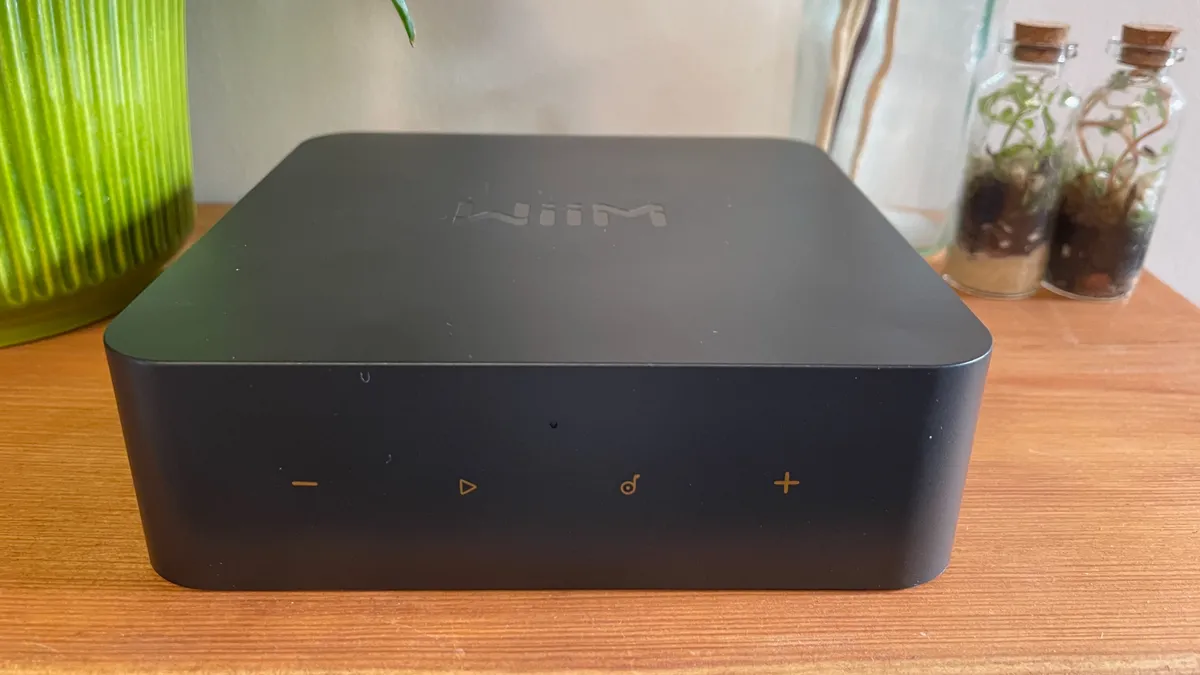
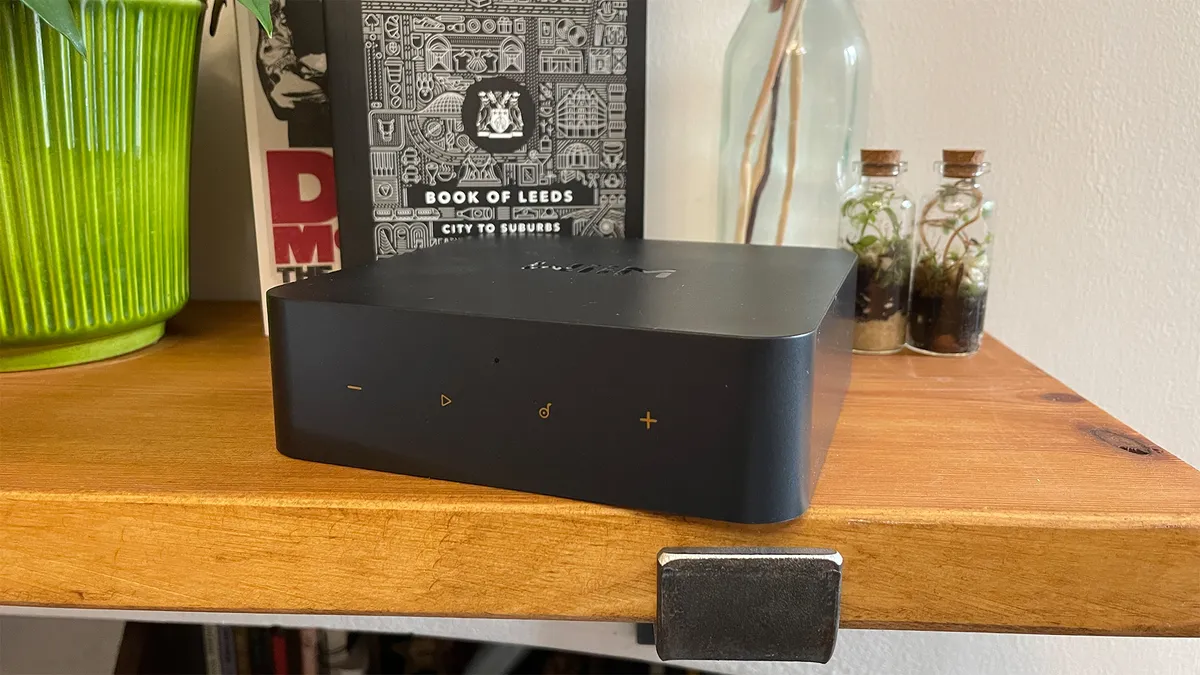

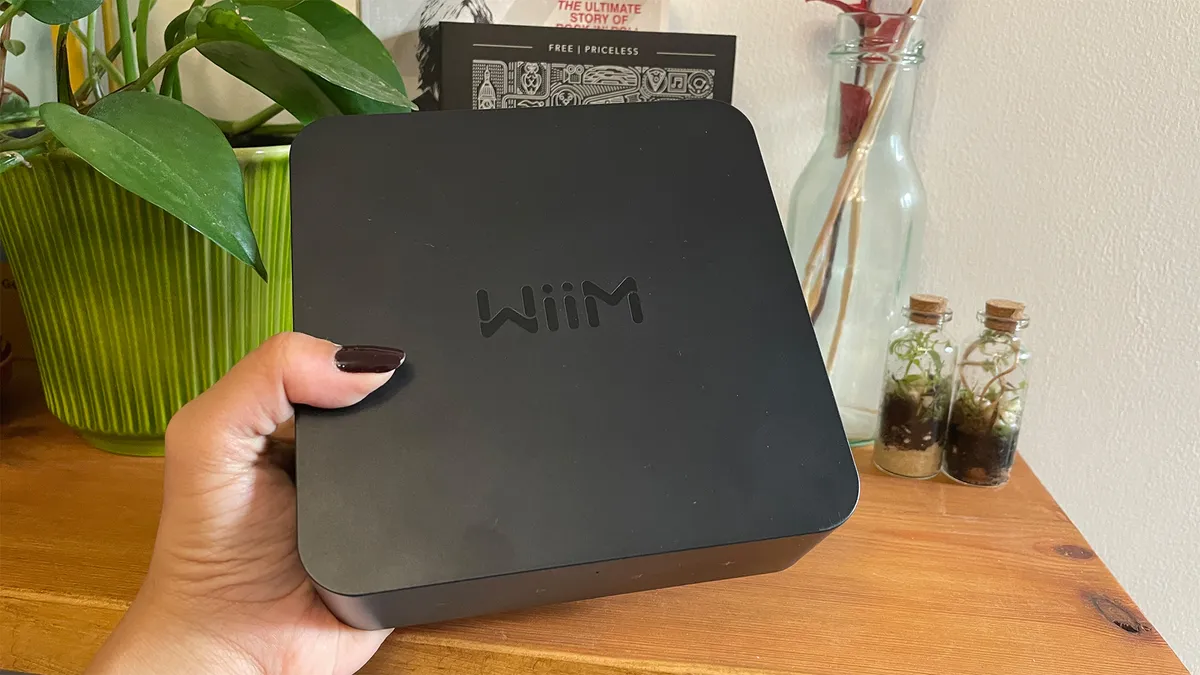

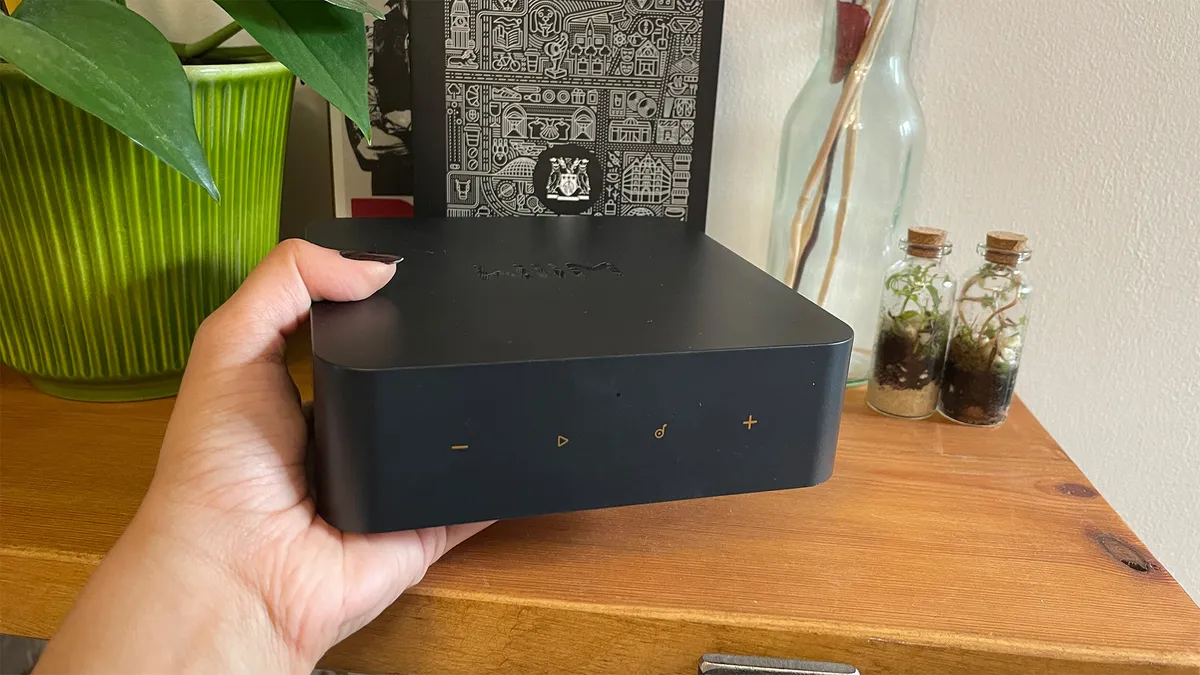


The WiiM Pro Plus is less than half the price of the budget music streamers we'd previously reviewed (see Cambridge Audio MXN10, above), and this tiny, extremely affordable unit impressed us so much that we knew it was worthy of aWhat Hi-Fi? Award win when we first reviewed it.
It's as feature-packed as any of its pricier alternatives, with AirPlay 2, Google Chromecast, Qobuz Connect, Tidal Connect, Spotify Connect and both wi-fi and ethernet connections available. The WiiM control app is its crowning glory – set up is swift and fuss-free, everything is logically laid out, and its user-friendliness will win many over.
Through the app, you get access to all other streaming apps and music stored on the same network. It also has line-level RCA, coaxial and optical connections, and can handle digital audio files up to 24-bit/192kHz. That's more versatile than we'd expect at this budget end.
It's ideal for adding streaming powers cheaply and easily to an older hi-fi system, but can also be used as a way of creating a multi-room system with existing kit.
On the audio quality front, the Pro Plus delivers a sound that's clear, detailed and even quite dynamically adept. Feed it high-quality source files, and you'll be rewarded with a big soundstage with instruments all relayed in an assured and confident manner.
Voices in particular get the benefit of this quality, as the midrange is full of character, attitude and emotion. It's not quite as muscular or as richly textured as its pricier alternatives, but there's plenty of attack that keeps a song's natural rhythm flowing. We certainly found ourselves enjoying every minute of it.
Despite increasing competition from the likes of the Bluesound Node Nano (yours for £299 / $299 / €349) and with the advent of its even more fully-featured WiiM Ultra flagship sibling (see below), the entry-level Pro Plus is a well-executed streamer that's easy to use, sounds accomplished and is packed with features. At its affordable price, we couldn't ask for more.
Read the full WiiM Pro Plus review
Best music streamer for versitility


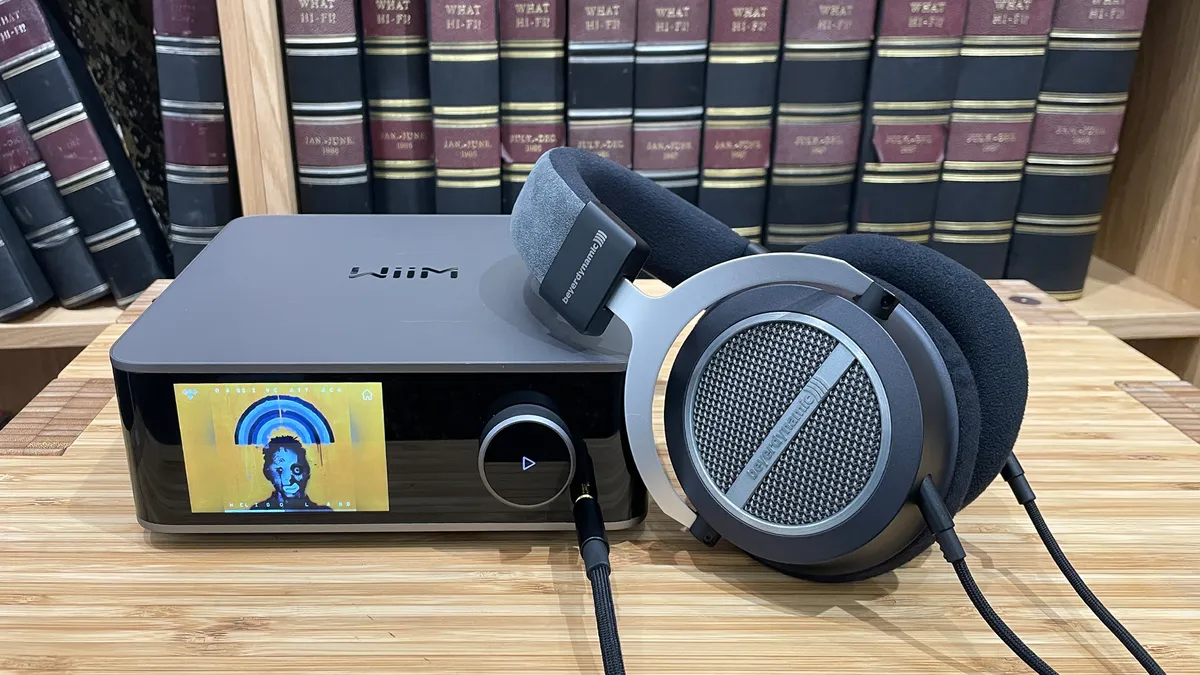


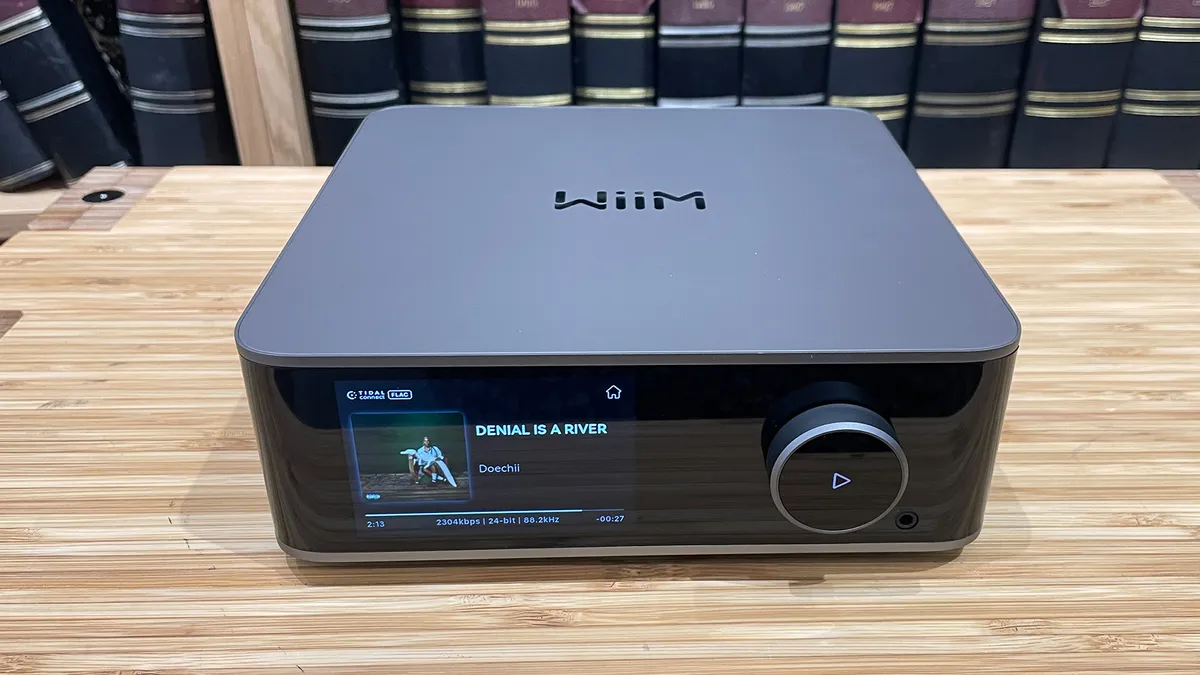
If the Pro Plus impressed us with its capabilities for such an affordable price, then its bigger brother, the WiiM Ultra, has blown us away with its elevated design, step up in sound quality and even more features for the price.
The WiiM Ultra is pricier than the Pro Plus, but it offers even more connectivity, including an all-important HDMI ARC for your TV, a moving magnet phono stage for plugging in turntables, and a 3.5mm headphone port. Add in the same slick operation, easy to use app and extensive streaming features (from Tidal/Qobuz Connect to DLNA and hi-res file compatibility), and the Ultra more than lives up to its name.
It has one glaring omission: AirPlay 2. This casting method is available in its price rivals but is disappointingly missing from the Ultra – so it could give Apple Music users pause before buying. In every other way, however, the sheer scope of the Ultra's versatility is astonishing for the price point. The Ultra's well-made design and the touchscreen display make it even more appealing, too. The screen is winningly responsive, letting you access playback options, settings and even favourite presets more readily than the neat app.
Sound-wise, the Ultra is a clear step above the Pro Plus with a newer advanced DAC and higher quality components resulting in a crisper, clearer and more organised sound. It's a more muscular, solid and expansive sound than the Pro Plus. We like its agility and lively sound, which manages to be impressively composed and detailed with all kinds of music. It sounds balanced across the frequencies too, making for an effortless and engaging listen.
The Cambridge MXN10 is its main rival at this same price point, and the MXN10 does deliver an even greater degree of detail and textural depth, bringing out greater nuances in voices and instruments. It is even more dynamically capable and rhythmically precise, too. But it doesn't stop us from enjoying the Ultra's sound quality, and its lethal combination of features, connectivity and terrific user experience for the price is unparalleled.
We find the Ultra charming in use and we imagine many will be attracted to its modern, touchscreen-enabled design and wealth of features at this affordable price. If you're able to stretch a bit further than the Pro Plus, this Ultra is an easy recommendation.
Read the full WiiM Ultra review
Best mid-price music streamer


"That the Bluesound Node Icon sounds so deft, composed and fun at this sub-£1000 level is pretty remarkable, and it does so with such ease that it puts rivals to shame."
That's what we concluded in our review, hailing Bluesound's most premium streamer as its best-sounding model yet. While Bluesound streamers have always been capable and feature-rich, it's the Node Icon that delivers the a truly musical and engaging performance that captives us no matter what we play through it.
At a fairly compact size compared with its traditional full-width rivals, the Node Icon cuts a classy figure thanks to its metal and glass construction. It's the first Bluesound streamer to feature a screen (which is very nice) and it features touch controls on the sloped glass panel, which does show up fingerprints.
At its heart is the very stable and comprehensive BluOs streaming platform, which runs smoothly, supports all the popular music streaming services, is compatible with hi-res files up to 24-bit/192kHz PCM and DSD256, and, like all BluOS-powered streamers, doesn't support Chromecast.
It has ample physical connections, and most unusually, it sports two 3.5mm headphone jacks. The unit is also compatible with Dirac Live Ready (you'll need to pay separately for a licence and the calibration kit) and it features MQA Lab's Qronos digital-to-analogue technology that promises to refine the DAC’s timing response.
With music, regardless of genre, we find the Node Icon to be a lively, dynamic performer that grabs our interest right from the start. It has a sense of spark that's been missing from previous Bluesound streamers; there is detail, agility, solidity and clarity, all underpinned by stellar composure and well-judged handling across the frequency range.
We said in our review that the Node Icon "doesn’t try to embellish any frequency, nor does it try to hide any warts – this is a quietly but terrifically capable performer that simply gets out of the way and lets the music shine through."
Rivals at this price such as the Cambridge CXN100 offer a bigger soundstage, but the Node Icon captures the essence of a song better. At this rather reasonable price, we couldn't ask for more from this feature-laden, fuss-free, talented Node Icon. We can't recommend it highly enough and it rightly deserves its Product of the Year win.
Read the full Bluesound Node Icon review
Best premium music streamer


As part of Arcam's Radia range, the premium ST25 leans into the Award-winning range's all-black modern aesthetic with a nicely built and minimal design. There are no buttons in sight on the front panel, which is dominated by a bright, punchy, colourful 6.5-inch high-resolution display with good viewing angles.
The physical connections are likewise pared back to the essentials, but it has a full suite of the most popular streaming features, including AirPlay, Google Cast, Spotify Connect, Tidal Connect, Qobuz Connect, and Amazon Music, and supports hi-res files up to 32-bit/384kHz PCM and DSD256. The only omission is Bluetooth here.
Inside the ST25’s chassis you’ll find a new six-layer digital audio and streaming platform. It works well, and the accompanying Radia app is neat and basic, but not quite as slick and intuitive as its Bluesound and Cambridge rivals. You'll also need the included remote to access some of the streamer's features, such as the digital filters.
But start playing, whether from Tidal or from your connected server full of hi-res files, and you'll be swept up by the Arcam's crystal clear delivery and rhythmic prowess. We said in our review that the ST25 has "an eerily quiet backdrop for the music, which allows all the instruments space to breathe."
There is fine detail and great texture to instruments, while vocals have nuance and emotional impact. Basslines sound agile and powerful, while the way every note is fleshed out and complex arrangements are organised with such ease and rhythmic precision is lovely to hear. Whether it's a high-tempo track or a contemplative piano composition, the Arcam takes it all in stride, delivering songs with a natural tone and superb levels of insight.
We found that the ST25's detailed and dynamic performance remained consistent throughout, and it played nice with various partnering speakers and amplifiers too – provided they were of a similarly talented calibre.
"Whether it’s internet radio or high-res audio streams, the ST25 presents them in a hugely enjoyable and musical way." Its performance is a huge step up from the enjoyable Bluesound Node Icon, and the ST25 is a feature-rich, stellar standalone music streamer at this level.
Read the full Arcam ST25 review
Best high-end music streamer


Cyrus Audio's new 40 ST surprised and impressed us, delivering a terrific performance that surpassed firm favourites at this premium end and also offering a fresh look from this 40-year-old brand. The new aluminium casework is classy and looks modern with its crisp, clear large display on the glass front panel, while still retaining Cyrus's iconic half-width chassis design.
The 40 ST uses the BluOS streaming engine, which comes with ample streaming features. There are some caveats, however: the BluOS platform doesn't support Bluetooth or Chromecast, but it does support AirPlay, Tidal Connect, Qobuz Connect, Spotify Connect and internet radio, amongst many other services. Hi-res file support is restricted to 24-bit/192kHz PCM and MQA, but this should be fine for most people with hi-res tracks.
While initially not supporting DSD files, a software update now makes DSD compatibility possible on the 40 ST.
What the Cyrus 40 ST does better than its rivals, however, is all to do with sound quality. Its breadth of talent and even-handed nature come to the fore as we work our way through our music collection during testing. It impresses us with a level of clarity and precision that we haven’t heard bettered anywhere near this price, while also sounding natural and engaging across all types of music.
Comparisons with the former Award-winning Audiolab 9000N and Naim ND5 XS 2 (both £2499) are interesting. The Audiolab majors on finesse, tonal neutrality and spaciousness, while the Naim is still king when it comes to rhythmic drive and outright punch. The Cyrus 40 ST, however, is more precise and insightful than both.
We said in our review that the 40 ST "sounds cleaner, crisper and more direct, finding another layer of textural detail in instruments and voices. Dynamically, it is impressively expressive, rendering low-level shifts in intensity elegantly, and delivering large-scale orchestral crescendos with real conviction..."
It's also a strong enough all-rounder to shine in a wide range of systems. Want even greater scale, power and authority? You can add on the outboard 40 PSU (power supply unit) for an even more fluid and muscular presentation for an extra (and admittedly hefty) £2495 / $3495 / AU$4499.
The gaps in specifications are of course an issue in such a premium streamer, but only you can decide whether they are enough of a negative to become an issue. All in all, though, this is a confident look towards the future from a brand that was lagging somewhat compared with the competition, and the 40 ST's high performance quality deserves to be applauded.
Read the full Cyrus 40 ST review
Best music streamer with a CD player

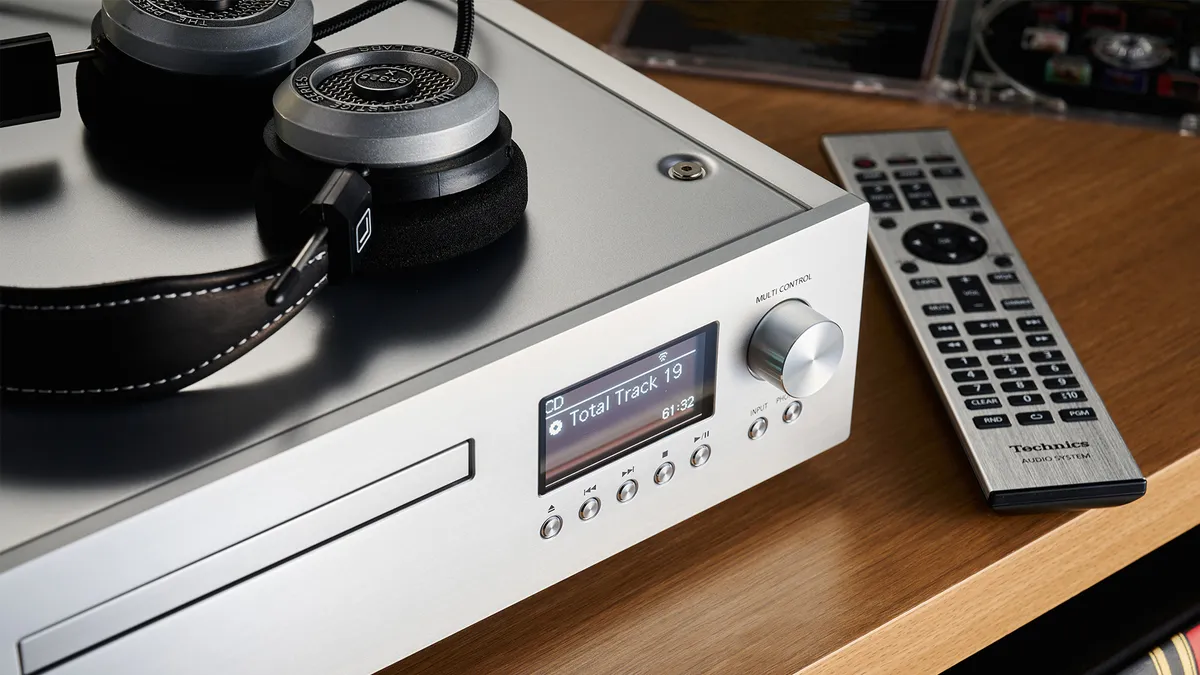


Combining physical media playback with wireless music streaming? This CD/SACD player with network audio streaming smarts is a product for the 21st century. The Technics SL-G700M2 is an excellent and versatile digital source that builds on its five-star predecessor, boasting a wealth of digital connectivity alongside a multitude of streaming options. Qobuz Connect is also on its way this year.
The SL-G700M2 remains a beautifully made box, with precision controls and a silky smooth disc drawer – the quality of fit and finish is among the best we have seen at this level. Some niggles from the previous first-generation remains, namely the app software for the streaming control isn't the best we've seen, but it still gets the job done.
The M2 version adds a new USB Type B input and a new DAC, swapping the older AKM AK4497 to an ESS ES9026PRO chip. This change is due to supply issues with the original chip, but incorporating the new DAC resulted in a digital board redesign and an excuse to improve performance even further, as well as update the power supply arrangement.
And we're glad they did. This Technics streamer sounds superb. Its presentation is clear, detailed and insightful, managing to organise the musical information in a cohesive and entertaining way. Its main talent lies in delivering music in a balanced manner, regardless of genre or source.
Bold and authoritative when the occasion calls for it; delicate where needed. This same character is present across all digital inputs and when used as a standalone DAC; it can be used with a wide range of partnering kit, too.
Musically engaging and versatile, this Technics SL-G700 is a capable streamer and CD player that covers all bases while being entertaining. Yes, it's possible to get better sound from a separates set up, but this well-conceived combination is hard to beat at this price.
Read the full Technics SL-G700M2 review
Best music streamer for headphones


The Uniti Atom Headphone Edition is a headphones-based version of the Uniti Atom – the entry-level machine in Naim’s What Hi-Fi? Award-winning Uniti just-add-speakers streaming system range – and like its forebear, this Edition features built-in streaming smarts and connections aplenty.
While the new Atom has been designed with headphones users in mind, it can, of course, also be used as a streaming preamplifier, either connected to a power amp or a pair of active speakers.
At its core is Naim’s streaming platform, a gateway to streaming services (such as Qobuz, Tidal and Spotify Connect), internet radio and DLNA playback, while support for AirPlay 2, built-in Chromecast and Roon builds on that streaming savviness. Analogue and digital connections, including USB, coaxial, optical, RCA and phono, are also onboard for connecting additional sources.
Sonically the Headphone Edition has all the traits we'd expect from the Atom, characterised by impressive insight, dynamism and musicality, but its presentation is even more sophisticated and open, with greater separation of instruments and superb levels of detail.
It's a bit more niche than most of the streamers on this list, but for anyone looking to unleash the potential of a premium pair of headphones with a multifaceted streaming system, either to use purely as a desktop centrepiece or to also slip into an existing hi-fi system, then this could be ideal.
Read the full Naim Uniti Atom Headphone Edition review
Also consider
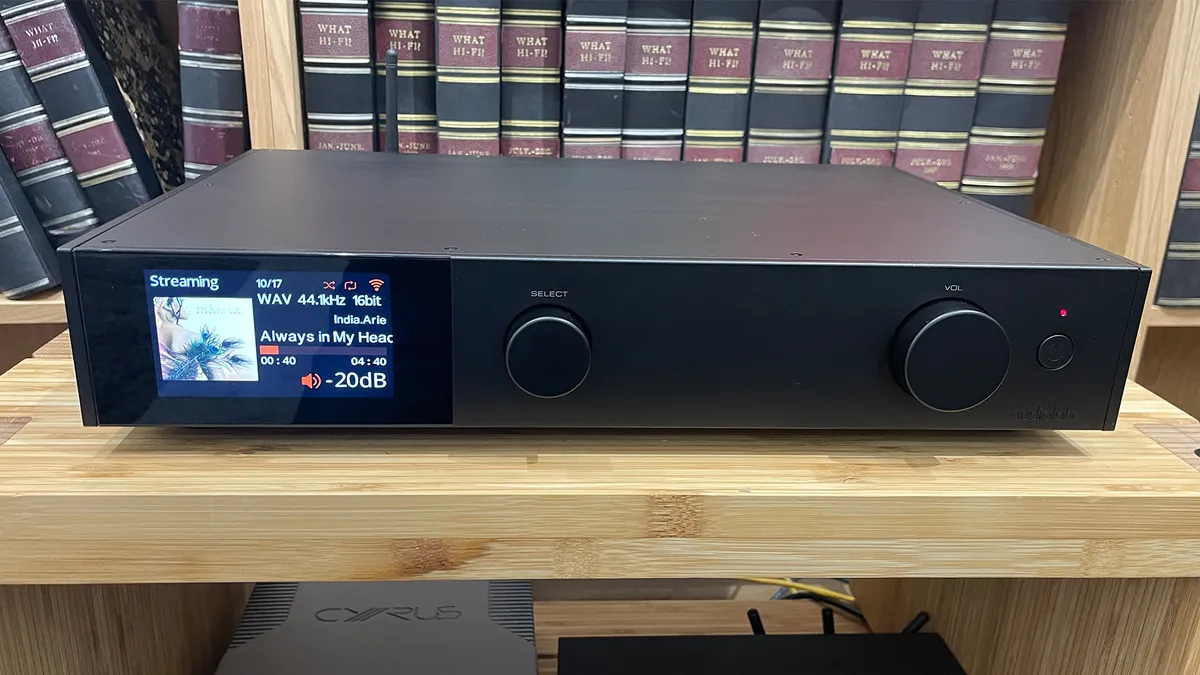
Cambridge Audio EXN100: With an exhaustive feature set (including HDMI) and a slick app, the former Award-winning EXN100 delivers very clear, open, and refined sound, with a huge expansive soundstage that rivals struggle to match. If you want a similar sonic character for less money, try the Cambridge CXN100.
Audiolab 9000N: It may not have all the streaming features as its rivals, but this former Award-winning Audiolab's clean, large-scale and spacious presentation makes it a remarkable listen, along with an impressive tonal neutrality.
Naim ND5 XS 2: It may have finally been ousted from its Award-winning perch by the neutral Audiolab 9000N, but this long-standing Naim remains a hugely musical and likeable streamer for the same premium price. It may look a tad old-fashioned with no display, but it is terrifically capable and tremendously fun to listen to.
Bluesound Node Nano: An entry-level alternative to the WiiM Pro Plus, the Node Nano offers a smooth, solid sound in a neat, compact package with ample streaming features. The WiiM is cheaper and offers even more streaming and connection features. Sound-wise, the WiiM is leaner and more agile, while the Bluesound is weighty and robust, but less rhythmically adept.
Lindemann Limetree Bridge II: If you already have a great DAC in your system, then you might prefer a streaming transport or network bridge, which handles all the streaming features but leaves the DAC duties to your existing DAC. This little Lindemann is easy to set up, has the essentials for hi-res streaming thanks to UPnP/DLNA and Tidal/Qobuz Connect (but lacks AirPlay and Google Cast). Paired with a great DAC, it sounds great: crisp and clear detail, a high level of transparency, excellent agility and expressive, enjoyable sound.
Naim NSS 333: If you are looking for something seriously high-end, this Naim streamer is one of the most musically satisfying listens we've heard for this category. It sounds intrinsically right, and its organised, articulate and dynamic way with all kinds of music is to be applauded.
How to choose the best music streamer for you

Music streamers are a standalone component of a dedicated hi-fi set-up. But while other hi-fi separates such as a turntable or CD player just have a simple job to do, a music streamer (or network audio streamer) has to manage many different wireless sources as well as be able to play music files from local storage on your network.
Compatible hi-res files and formats
Most of the selections on this list support the vast majority of hi-res music formats, though the upper limit can vary between 24-bit/96kHz PCM files for more basic products and up to 32-bit/768kHz for those that aim to push the boundary. We wouldn’t get too hung up on the numbers, though, as the vast majority of music isn’t available in those more extreme file types. CD quality is 16-bit/44.1kHz, and a capability of 24-bit/192kHz should be more than enough to meet the needs of most audiophiles.
Key streaming features and physical connections
Connectivity-wise, streamers can boast AirPlay 2, Bluetooth, Spotify Connect, UPnP/DLNA compatibility, and physical connections. Regardless of the model, you should also be able to play local music files from a connected NAS drive and play thousands of internet radio stations. You'll also be able to play from your favourite music streaming services – at least Spotify and quite probably higher-quality alternatives such as Tidal or Qobuz (and their Connect versions) are supported – as well as internet radio. Always double check it has the feature(s) that you enjoy using the most.
Bluetooth is almost always included, and if it’s the more capable and better-quality aptX HD form, then all the better. Most audio streamers will also have digital inputs, so alongside playing music files from a USB stick or flash drive, you’ll usually be able to feed in optical and coaxial digital feeds too, making the streamer something of a digital hub for your system. We're also increasingly seeing streamers include an HDMI ARC input and even a phono stage in some cases, to increase versatility.
App control and ease of use
To get the best user experience, you’ll really need a smartphone or tablet to control your streamer. Using your streamer's app is the best way to navigate large music libraries, swap between sources and the quickest way of making playlists. If that doesn't appeal, you may want to look for models with a large display and traditional remote control. What's key is making sure that the unit is easy to use and navigate, and doesn't stutter or fail when juggling so many different streaming options.
Stable, uninterrupted internet connection
Since we’re talking about practicalities, it’s worth mentioning that the first thing any music streamer needs is a stable home internet network, and you need to decide whether to connect the steamer directly with an Ethernet cable or go wireless. Going wire-free is appealing, as it makes things easier and tidier, and provided your network is stable, should work fine for many people. If you can, though, stick with wired because it gives a more stable connection and deliver the best sound quality, making everything go more smoothly over long-term use.
Price-wise, as with all things hi-fi, streamers can vary hugely, and how much you can expect to pay depends on the rest of your set-up. We would suggest that spending broadly the same as your amplifier would be a decent place to start, though it always pays to be flexible to get the right one.
Budget
Whatever your budget, music streamers are a great way to upgrade your sonic experience from a simple wireless speaker, especially if you want to give your digital music collection its proper due. If you love the convenience but want better sound and have the room and budget to accommodate a stereo system, a hi-fi streamer is the way to go.
Almost regardless of which music streamer you buy, you will gain access to an astonishing range of music – but pick with care, and it will make listening to that music all the more enjoyable.
How we test music streamers
Every music streamer that we review and rate at What Hi-Fi? is tested in our dedicated, acoustically treated testing facilities in Reading and London, where our in-house team of experts put every new product through our rigorous testing process.
What Hi-Fi? is all about comparative testing, so every music streamer we review is listened to and tested against the current leader in its field and price point to gauge how it compares to the best-in-class competition. We keep our five-star and Award-winning streamers in our on-site stockroom so they're always at hand for comparisons with new products.
For all music streamer reviews, we compare streaming smarts, specs and connectivity, and also use them over a number of days or even weeks to test how seamless they are to use in everyday listening.
We always ensure we spend plenty of time with a new music streamer, making sure they are fully run in before we begin testing and trying them with different partnering equipment, using various file formats, streaming services and music genres as part of our testing process.
We also test every connection, both wired and wi-fi streaming – from AirPlay and Bluetooth to playing hi-res tracks stored on our NAS storage, and trying out the USB, digital and analogue connections. We also test how easy the streamer is to use with the accompanying app, remote and on-screen display (if it has one), and keep an eye (and ear) out for any connection dropouts.
All our review verdicts are agreed upon by the team as a whole rather than a single reviewer, to avoid individual subjectivity and bias. There is never any input from the brand, the PR or our commercial teams on any of our reviews or the final verdict. We are proud to have delivered unbiased, independent reviews for nearly five decades, and that won't change any time soon.
You can read more about how we test and review products on What Hi-Fi? here.
FAQ
Are music streamers worth it?
It depends on how you listen to music, and how versatile you want your system to be, but on the whole, yes it is worth it if the majority of your listening is digital/wireless-based.
On the whole, music streamers offer a wealth of features – both wireless streaming and wired connectivity – that many other kit simply doesn't. If you listen to music or radio across a variety of online platforms, subscribe to more than one streaming service, or have a digital library full of music files – a music streamer makes it easy to access all these different sources from one place.
The best music streamers will deliver all your music in the best sound quality possible too, as well as support native playback of high-res file formats.
Is a music streamer better than Bluetooth?
Yes. A dedicated music streamer uses a wi-fi network for streaming music, which offers a wide bandwidth and is able to transmit higher-resolution audio files without any loss of data.
Conversely, Bluetooth is a very compressed and lossy method of streaming music, with a very limited range. It also only allows one-way streaming or control between your mobile device and audio system.
Using wi-fi to stream music allows you to make calls, control playback and use apps as usual on your mobile device without it affecting playback. Even on the same music streamer, using wi-fi to play music will always sound better than using Bluetooth.
What is the difference between a music server and a music streamer?
A music server is a combination of file storage and streaming abilities, useful for organising, assigning/editing metadata and browsing your digital music library. Products like Melco's N100 or N10/2-S38 are prime examples of powerful, high-quality music servers, while Roon's Nucleus is another option.
It can come with its own app, its own network connection and even sometimes has CD-ripping powers, as the Bluesound Vault 2i or the Naim Uniti Core. It's expensive but a high-quality way of building your digital system.
Music streamers don't tend to have built-in storage, and you'll need an external server, NAS or hard drive for music file storage, which a streamer can access through wired or wireless means. Music streamers do have more versatile streaming features and usually include a built-in DAC (which music servers don't always have).
A server is most useful if you have a large, dedicated collection of downloaded hi-res or DSD files, while a streamer is best if you listen to online streaming platforms more frequently.
For more information, read our guide to building your own digital music library
Recent updates
- March 2026: Added Bluesound Node Icon and Arcam ST25 as new entries following their What Hi-Fi? Award wins. The Also Consider list has also been updated.
- September 2025: Updated entries to reflect Qobuz Connect inclusion, and added Eversolo DMP-A10 mention to the Also Consider section.
- July 2025: Added the Lindemann Limetree Bridge II streaming transport to the Also Consider section.
- June 2025: Added Qobuz Connect to the tech specs of products that support the new streaming feature.
- May 2025: No new entries, but we have double-checked the price and availability of all products on this list, which remain our top picks.
See more updates
- March 2025: We've added fresh streaming stats from UK and US, added comparisons to the WiiM Ultra in the MXN10 entry, and checked all products and prices are correct and available.
- February 2025: Added the freshly reviewed five-star WiiM Ultra to the main list.
- January 2025: Added the five-star Cyrus 40 ST to the main list, added Bluesound Node Nano to the Also Consider section, and updated entries to reflect new reviews.
- December 2024: Updated references to recently tested Bluesound Node (2024).
- October 2024: Added new Cambridge Audio EXN100 and Audiolab 9000N entries following five-star reviews; labelled new What Hi-Fi? 2024 Award winners; added Naim ND5 XS 2 to the Also Consider section.
- September 2024: Included mentions of new Bluesound Node models that will rival the Cambridge Audio and WiiM entries.
- July 2024: Added newly reviewed Audiolab 9000N entry in the Also Consider section.
- May 2024: Added a new FAQ section.
- March 2024: Added Also Consider section to offer more buying options.
- October 2023: Added WiiM Pro Plus following five-star review and Award win. Highlighted products that won 2023 What Hi-Fi? Best Buy awards.
Today's best deals
