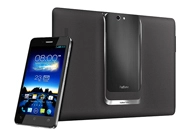

Asus has clearly been busy: at Mobile World Congress 2013, now running in Barcelona, it's announced it's all set to launch its £600 PadFone 2 smartphone/tablet hybrid (above) this week in the UK.
There's an upmarket PadFone Infinity version coming later this year, with £130 7in MeMO Pad ME172 and £250 10.1in MeMo Pad ME301T tablets hot on its heels.
Article continues belowAlso on the way is the company's 7in smartphone, the £180 Fonepad.

Available to pre-order from Friday, the PadFone2 combines an Android smartphone with 4.7in display and a docking station with a 10.1in screen. The phone uses a 1.5GHz Qualcomm Snapdragon S4 Pro quad-core processor, and has a 1280x720-pixel Super IPS+ display and a 13MP camera.
Its onboard battery gives up to 16 hours of 3G talk-time and 13 hours of Wi-Fi use, while the battery in the PadFone2 station can give unto 36 hours' use, and also has the capacity to recharge to phone battery three times over.
When docked, the combination reformats apps and other content to suit the larger screen.
The PadFone 2 has 64GB of internal storage, and comes complete with two years' Asus Web Storage.
Available in black or white, it can be preordered from this Friday, March 1st, at Carphone Warehouse, John Lewis, Selfridges, Amazon.co.uk, Ebuyer.com, Scan.co.uk, Box.co.uk and laptopoutlet.co.uk, and will be in-store at selected retailers from late next month.

It will be followed later this year by the PadFone Infinity, expected to sell for around £800.

With a metallic finish and a 5in display on the smartphone, it has 1920x1080 Full HD resolution, 64GB of storage, and the Snapdragon 600 1.6GHz processor. Like the PadFone2 it supports both 3G and 4G/LTE.


If you want a larger screen on your smartphone but want to carry a single device, this is the Asus Fonepad, starting from £180 for the 16GB version, is a 3G smartphone packing a 7in 1280x800-piexl screen.
Asus Chairman Jonney Shih (left) says that '“It's ideal to have a larger screen with entertainment, social media and other online activities now playing an increasingly important part in our mobile lifestyles.
'The incorporation of 3G mobile data with full telephony support, makes the Fonepad the perfect combination of a tablet and phone in one single device.'
Available now to order is the first of two Asus MeMO Pad tablets announced at MWC, the £250 10.1in MeMO Pad ME301T.
The company says the name is pronounced 'memo' and stands for 'My Mobile, My Moment': the ME301T runs Android 4.1, uses an NVIDIA Tegra 3 processor and has a 1280x800-pixel display.

The 16GB of onboard storage can be expanded using SDHC cards, there are front and rear cameras, and the tablet uses Asus SonicMaster technology, which includes 'large resonance chambers and stereo speakers with 25x12mm metallic drivers'.
It can be preordered now at currys.co.uk, pcworld.co.uk, tesco.com and amazon.co.uk, and will be in-store fromMarch 7th at Currys, PC World and Tesco stores.
Completing the line-up is a 7in tablet, the £130 MeMO Pad ME172V, which uses a 1024x600-pixel display. It will be available from mid-April.
Then, the clouds opened, and...
Finally, the company announced at MWC the launch of its ASUS Open Cloud Computing (AOCC) strategy, which aggregates cloud storage into a unified virtual service to simplify sharing photos and other media with multiple devices, and offers a wide range of online help and troubleshooting tools to solve all manner of technical problems.
Jonney Shih says that. "We have been incubating this exciting idea for several years: we believe that an open and balanced architecture can provide the best, ultimate solution for the new ubiquitous cloud computing era.”
AOCC combines four services: AOCloud, AOLink, AOStream and AOHelp.
AOCloud aggregates cloud storage services from both ASUS and other providers into a single virtual service with a single login to make accessing files stored online easier, and also supports personal cloud storage via ASUS AiCloud and compatible ASUS routers, so files stored on home networked-attached storage (NAS) can be accessed just as easily as those stored in the cloud.
AOLink works with AOCloud to stream audio, video and images between devices and services, while AOStream is a personal journal for photos and web clippings with local synchronisation across connected devices, and unlimited uploads to dedicated cloud storage.
AOHelp is a suite of troubleshooting tools designed to solve common computer problems with automatic optimisation and diagnostic software, and secure remote assistance for ‘hands-on’ fixes from ASUS technical support.
