
Want to play GTA 6 in the best quality possible?
Then we have a serious contender. We were recently blown away by the Samsung S99H during testing – so much so that our TV experts declared the set to be the flagship OLED to beat this year. It may even be good enough to dethrone our current champion, the Sony Bravia 8 II.
This high praise was, in part, due to the excellent gaming features that cater for even the most hardcore gamers, making it one of the top options if you’re looking to seriously splash out for GTA 6.
Luckily, you won’t have to splash out quite as much now – the brand-new OLED is already reduced to £1899 at Richer Sounds for the 55-inch model.
That’s a decently hefty saving of £600 for a TV we reviewed only two weeks ago; but you’ll have to follow a few steps first. The code TRADE250 will bring the price down to £2149. You can then claim £250 back from Samsung after purchase – full Ts&Cs here.
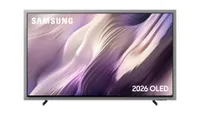
The Samsung S99H is an all-round powerhouse that can handle whatever content you use it for, but it is particularly well equipped for GTA 6 and all things gaming.
This includes support for VRR, ALLM and HDR10+ gaming. It has not yet been confirmed what frame rate GTA 6 will run at, but either way the S99H will be prepared, with support for up to 4K/165Hz signals across all four of its HDMI 2.1 sockets (including the console-friendly 4K/120Hz format).
However, just as impressive is the stunning, contrast-rich picture.
“The resulting picture is extraordinary, and it makes any content we throw at it – from Blade Runner 2049, Civil War, Pan and Drive, to No Time To Die and The Batman – shine,” reads our Samsung S99H review. “We have the S99F set up next to the Award-winning Sony Bravia 8 II, and despite the tough competition, the Samsung delivers an unflinching visual feast.
“Starting with the opening scene of Blade Runner 2049, we find that the S99H serves up oodles of contrast, which results in a deeply three-dimensional picture with superb highlights.”
The S99H’s sound is also a big improvement from its predecessor, the S95F, with plenty of height and width. The 4.2.2-channel 70W sound system lacks volume, but it is ultimately an enjoyable built-in sound system.
In addition to the gaming goodies, Samsung has crammed just about every imaginable feature into the S99H. This includes Samsung’s reliable Tizen OS platform, which has had a slick refresh and covers the usual wide range of domestic and international streaming apps.
There is HDR support in the form of HDR10+, HDR10 and HLG. Dolby Vision is one of the S99H’s most notable omissions, but the next-generation HDR10+ Advanced is on board.
If you want to maximise value, the Sony Bravia 8 II is similarly talented and is available for a cheaper £1699 at Richer Sounds, using the code RSTV100. But if you want to splash out on a new 2026 flagship OLED, we are struggling to find reasons not to recommend the Samsung S99H with £600 off at Richer Sounds.
MORE:
Also consider the LG G6
Read our Philips OLED910 review
Best TVs: flagship OLEDs and budget Mini LED sets tried and tested

