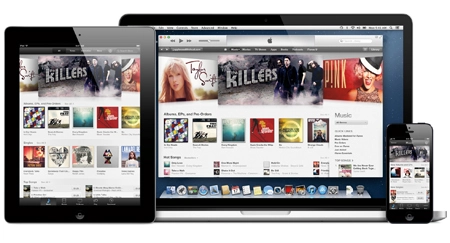
Apple releases iTunes 11 with new look and new features

UPDATE: Apple has released iTunes 11. You can download the new version by hitting 'Check for Updates' in iTunes or heading to the Apple website.
The new version promises to be the biggest redesign of iTunes yet, bringing better iCloud and iTunes Store integration and a new iPhone-style interface.

Improved search, a neater mini pop-out player and the end of Ping, Apple's ill-fated social music interaction, are other iTunes 11 highlights.
The new version was originally scheduled for release at the end of October but was delayed and put back to "November", a vague deadline which Apple has managed to meet (just).
The interface is now uniform across all devices, and even better you can pause playback on one device, say your laptop, and then carry on playing where you left off on another device, such as your iPhone.
There's also a new iTunes logo and the promise of faster browsing, search and syncing with iCloud.

Published 30.10.11
Apple has confirmed that iTunes 11 has been delayed and will now be released some time "before the end of November".
Originally predicted to be announced alongside the iPhone 5 or the new iPads, iTunes was then pushed back to October.
An Apple spokesman has now confirmed the latest version of the software has been delayed and will be out some time in November.
Tom Neumayr, Apple, told AllThingsD: "The new iTunes is taking longer than expected and we wanted to take a little extra time to get it right.
"We look forward to releasing this new version of iTunes with its dramatically simpler and cleaner interface, and seamless integration with iCloud before the end of November."


Comments
Hours and hours spent adding artwork from my collection (mostly ripped from my own CDs), a promise to sort it all out if you let Apple see it, now nothing at all. 24 hours and still nothing. Also cover view seems to have disappeared. I will need to downgrade, and decline the opportunity of updating when it nags. I don't want to sync my iPhone as this may be affected in the same way. Hopeless.
Nope... artwork issue still the same. Am going to have to get a Genius appointment on this one. Either I am doing something silly or there is a problem.
Well well well....
iTunes update this morning. Maybe that will fix some things. Says it fixes the Match problem, the duplicates problem but no mention of artwork.
We'll see...
Hi Georgem
No, doesn't work on my Mac - the Artwork option on the info screen is greyed out or simply not there. Something wonky going on. Also, I have ripped a few hundred more CDs since this thread started and many of them are being given the wrong artwork or none at all, even when the CD is in the iTunes store. Gracenote identifies the CD correctly but, if the title and artist are not character for character as they are displayed in iTunes, the artwork does not attach. So I have to manually edit the tracks to ensure that they are and then the artwork comes over.
But that does nothing for the bigger issue of meta data not being stored with the tracks. All I want to do is to use a streamer - A Cambridge Audio Stream Magic 6 - to stream tracks from a NAS, ripped by iTunes. It sort of works, but I don't get artwork or proper meta data, just the track name. Does anyone know of software that can fix this? I have Coverscout and with a NAS it is hopeless.
AAARRGGGHHHH...
At least Google Maps is available now and Nokia Here. Meanwhile no fix in sight for the CrapMapApp...
I find iTunes a huge letdown the issue with the album art is irritating but more so is the problems with iTunes Match. I usually stream from my pc or iPad through an airport express but since the upgrade to iTunes 11 this has become a nightmare. Usually it doesn't work at all and when it does it just keeps skipping through my library unable to select a track to play. If I do manage to get something playing it keeps stopping so unless resolve pretty soon iTunes Match will be going. Spotify still streams perfectly and I tried google play and that worked perfectly to.
On a mac I can get this to work for multiple tracks.
Copy art from external site, after selecting all tracks for album select get info. Accept make changes to multiple items and make sure you have artwork box on info tab selected then paste in image.
Mac or PC?
On my Mac (Mini or laptop) there is no way I can get it to add artwork. On previous versions, all you had to do was find some cover art and then either drag it over the artwork box in iTunes, or ctrl C then Ctrl V it. You could do it for single songs or albums, or a selection of tracks. Or you could go the Get Info route, select the artwork option and either select a file or drag and drop. I can't get ANY of these to work with 11. If you are fortunate enough for it to find artwork, all is well, but if not, there seems to be no way forward.
I would be relieved to find I am doing something wrong/daft. May well go to the Apple store with it and see if they can get it to work.
Seems to be exactly the same way of adding album artwork as before. I've just done it for Grace Jones, Hurricane.
Hi Georgem
Thanks for that. Doesn't work though. When I select all tracks and then 'get info', there is no artwork box. It used to be very easy to do, I did it for hundreds of albums in prior versions of iTunes. I am now ripping them again for a NAS drive using no compression, hence my complaint about 11. I have tried all ways, read all the help systems, even purchased CoverScout and that doesn't do it either.
My overarching point is that there is a dire need for some systems integration work between iTunes and the rest of the world.
To add album artwork when not available from Apple.
Copy image required, choose album missing art in album view then select all tracks. Right click select get info from menu and then select the artwork box on the info screen. Use cmd-V to paste artwork for all tracks.
Hope this helps.
It is worse than that.
It doesn't always apply the artwork from albums that are in the iTunes store. Sounds like a minor point but because of the way it displays album titles, they often get shortened and it is the artwork that helps to identify them. And it keeps the artwork, and some of the meta data, separate so when you use something like a Cambridge Audio Stream Magic 6 and a NAS drive it is a bit of pig and, at least when using a Mac, not a good solution. I use Eyeconnect to get an iTunes server capability but, whilst it works for a techy, it isn't a good solution for the family. When you are talking of a largeish number of CDs the clunkiness becomes a serious issue. The FLAC files I download from Naim or B&W or similar all work seamlessly, with all artwork and metadata displying perfectly, except not in iTunes, which does not support them. I can't imagine I am the only one hacked off with it - it all feels like early days and someone is going to produce software that ties it all together properly. Must be an opportunity to find the best software combination out there and produce a special pullout section for WHF or similar?
And still no sign of supporting really hi resolution downloads or FLAC. Apple's stratgey over the past 7 years or so has been brilliant and the best - there are good reasons why they are the world's highest value company, they have broken rules that were thought to be immutable and reinvented them in such a way that it is difficult, even impossible, for others to follow, but the cracks are showing. I do understand Apple's fixation on their own proprietary standards as part of that strategy, but hi res formats are an emerging marketplace and when they have no support for them it forces you to look elsewehere. And switching between platforms isn't something anyone does lightly. For the first time in a long time I am wondering about whether I did the right thing in moving to Apple (after being with Windows since before it was born) a couple of years ago.
In the meantime, I am looking for another way of handling my music and ipods/pad/phones.
WAKE UP APPLE!!!
Adding album artwork
I've used iTunes since the first release and I really don't like 11 at all. Is it just me or has anyone else found it impossible to add artwork to albums when said artwork is not available from Apple? It used to be easy and reliable, now it seems to be impossible.
After the MapApp debacle, iTunes11 being late and what not, Apple need to be careful. For the first time ever, I am looking around for an alternative piece of software.
Not amused.
They have removed the Genius button it is my Favorite feature, now have to right click and select the genius you want, not the end of the world but they should have kept the button.
The sharing thing will improve as its asking everyone to share details of art covers extra which helps and saves you time looking for it yourself, though at the start it will bit abit slow due to the lack of infomation it has.
You can now stream your movies/tv shows if you have a fast enough broadband, so you no longer need the extra hdd space to store everything
I'm surprised no one on any website has mentioned the "new feature": to activate "Automatically download album artwork", you HAVE TO allow Apple to "Share details about your iTunes Library with Apple".
I find that more than a bit intrusive.
I think I will continue to use www.albumartexchange.com or Amazon, and scan my own classical cd covers.
Didn't work for me initially, when doing through Itunes it told me that it was up to date. It did work for me though, via the app store. Wish I hadnt bothered, all my info is gone (or at least not readily available as it was before)
Not working for me ? Any ideas ?
Trying to update via 10.7 - check for updates - on Windows 7 pc ?
Is it experiencing issues or is my pc having a funny 5 minutes ?
Corrected. Thanks.
The "Apple website" link is another link to a What Hi Fi news page.
One of the reasons for the delay, is possibly because they're now integrating the new music streaming service recently reported to be coming in November.
It has previously thought to be run from an app, but it might now be built-in to iTunes instead?
We'll soon know, one way or another.
Well they've fired the guy behind them... He wouldn't sign the apology, supposedly. Perhaps he just couldn't find the meeting.
They want to work on maps too. Still shocking....