
There are two ways to procure a hi-fi system: build one out of hi-fi 'separates', where every component (amplifier, speakers and at least one source) is housed in a separate box, or buy an integrated system whereby every element can be covered with simply one or two products.
This buying guide covers the latter – integrated multi-tasking music machines that typically pack every job of a system into fewer boxes, making your journey to audio nirvana much simpler. To a large extent, it takes the space, expense and the time to research product synergy and set up out of the equation.
Such hi-fi systems come in many forms. You have all-in-one microsystems complete with speakers; stereo speaker pairs housing everything you need, including amplification and streaming; or single amplifier boxes of streaming, CD- or vinyl-playing electronics to which stereo speakers must be added. And naturally, they vary wildly in performance capabilities and asking prices.

The best of each kind is covered in our definitive list below, but they all share one thing in common: class-leading performance at their price level. They combine flexible features and intuitive usability, too, ensuring they are as pleasing to operate as they are to listen to.
Our expert in-house reviews team tests hi-fi systems throughout the year and across the market, with each one benchmarked against its closest competitors. Naturally, only those that come out of our comprehensive testing criteria with flying colours make it into this definitive hi-fi system buying guide.
5th February 2026: We've given this page a major rehaul. New entries on the main list include the NAD C 3050 (with MDC2 BluOS-D module) as our best overall pick and the Arcam SA35 as our favourite premium streaming amp, while the likes of the WiiM Amp Ultra, Naim Uniti Atom and Ruark R610 have been added to the also consider section.

I'm a senior staff writer who has listened to and reviewed hundreds of products during my time at What Hi-Fi?. Now smarter than ever and with fewer compromises than before in the sound department, the integrated systems you see below are fantastic ways of obtaining proper hi-fi sound without needing to go the whole hog and set up a purist 'separates' system. Whether you simply want an easy vinyl playback solution or everything the streaming world offers, you can now get it from high-performing and space-efficient offerings that don't need to break the bank.
Best overall


To look at, you'd be forgiven for thinking that the NAD C 3050 (with MDC2 BluOS-D module) was just another product cashing in on the whole retro revival, with its walnut-covered casework and old-school VU meters harking back to the classic hi-fi of old.
In no way, however, is this some sort of anachronistic dinosaur. The NAD exists as a decent integrated amplifier, but once fitted with the MDC2 BluOS-D module that gives it streaming powers, it becomes an extremely talented just-add-speakers streaming amplifier.
The NAD is equipped with a moving magnet phono stage, two-way Bluetooth (of the aptX HD variety), coaxial and optical digital inputs and a decent power output of 100 watts per channel. There's also a front panel-mounted 6.3mm headphone output and an HDMI eARC input to help the NAD integrate into an AV set-up.
With that BluOS module included, you can stream music files from your home network, play internet radio or access any of the usual streaming services through wired or wireless means, with support for PCM files up to 24-bit/192kHz. The BluOS platform and controller are stable and easy to use with multiple sources and large libraries.
There's no DSD file support on offer here, and while Spotify and Tidal in Connect form are available, Qobuz Connect isn’t just yet. Similarly, Apple AirPlay 2 is on the menu, but Google Cast isn't supported on a BluOS system.
Take a look inside and you will find NAD’s trusted HybridDigital UcD output stage delivering a solid 100 watts per channel into both 4-ohm and 8-ohm speaker loads. The output rises to a claimed 135 watts per channel on short-term dynamic peaks.
A Texas Instruments PCM5242 differential 24-bit/192kHz DAC chip is at the heart of the C 3050 (with MDC2 BluOS-D module)'s digital circuit, with NAD’s engineers choosing it for its dynamic performance and resistance to clock jitter.
As a result, the streaming amp really packs a punch. The NAD has a huge array of talents on which it can draw, exhibiting outstanding midrange clarity and fluidity to make vocals shine, and while it can be subtle and refined, the BluOS-boosted C 3050 has the bite and brawn to give orchestral pieces the cinematic treatment.
As we said in our review, the NAD "sounds muscular, delivering lows with a richness and punch that’s enjoyable. The presentation is airy but still manages to retain the music’s exuberance" no matter what we feed it.
With its retro appeal, outstanding sonic abilities and enviable streaming smarts, the C 3050 (with MDC2 BluOS-D module) is highly recommended as a beautifully rounded streaming package.
Read our full NAD C 3050 (with MDC2 BluOS-D module) review
Best microsystem


The default budget all-in-one system choice for years, this Denon multi-Award winner is still at the top of its game, so much so we're yet to really find anything of its type that can outdo it at a similar price.
You can buy the D-M41DAB with or without Denon's own speakers. Without, the system is called RCD-M41DAB and can be found online for under £250 / $350 / AU$500. The speakers are dubbed SC-M41; put the two together and you have the D-M41DAB. Indeed, we'd happily recommend Denon's speakers if you don't have your own already.
The inclusion of Bluetooth (which can be turned on or off to avoid affecting the D-M41DAB’s overall performance) is cause for celebration, as is the superb sound quality. In terms of performance, this system could hold its own against groups of separates at a greater cost, with a graceful, insightful and expressive sound.
"The combination of low-end stability and dynamic sensibilities leaves us with a remarkably human performance for a hi-fi system at this price," our in-house experts penned in our D-M41DAB review.
Microsystems may seem like a dated concept nowadays, but this Denon proves that they can still be a perfect route to convenience and great-value sound; a way to get true stereo room-filling sound that a one-box system can't always deliver. A truly remarkable system for the money.
Read our full Denon D-M41DAB review
Best budget speaker system


If you're seeking a great, affordable active wireless speaker system, the Award-winning Triangle AIO Twin is your best bet. These active speakers have fully-fledged streaming support, making them a perfect little system in their own regard without needing an external source or amplification.
The handsome AIO Twin can play just about anything, from Bluetooth streams with apX HD support to music files stored on your home network (via wired Ethernet or wi-fi), with the likes of Spotify, Tidal, Qobuz and Deezer all supported. You can even get your vinyl spinning thanks to the Triangle's handy built-in phono stage.
Physical connections, meanwhile, include an RCA analogue pair, 3.5mm aux input, an optical input, USB-A for charging your phone, and a subwoofer output if you're keen on boosting your bass via a three channel setup.
It won't let you down sonically, either. As we said in our original review, the AIO Twin is "incredibly fun to listen to. It’s an enthusiastic performer, happy to tackle any music genre and recording quality, and simply wants you to enjoy the music being played".
That sense of fun is tempered by an underlying mature and composure, offering excellent handling of timing and dynamics and a its balance across the frequencies, anchored by a taut, controlled bass reproduction.
The phono stage isn't quite up to the standard the rest of the Triangle exhibits, and while its peppy character remains the same, it doesn’t sound as clear, precise or expressive compared with the other inputs. If you're serious about your records, maybe invest in an external phono stage.
That aside, if you’re looking for a fun music system that also sounds hugely capable in hi-fi terms, and that you don’t have to pay big money for, the Triangle AIO Twin is well worth your attention.
Read our full Triangle AIO Twin review
Best desktop speaker system


The KEF LSX II LT represents outstanding value for money. Taking the original recipe of the Award-winning LSX II, dropping a few minor features (no aux input here, sadly) and replacing the wireless inter-speaker link with a purely wired connection, the desktop and lifestyle-friendly LT represents as much pound-per-sound performance as you're likely to get from an all-in-one wireless speaker system of this type.
Acting as a network streamer, Bluetooth receiver and amplifier built into a compact pair of stereo speakers (the speakers are smaller than the Triangle AIO Twin boxes above), the KEF LSX II LT is a great way of getting the look and feel of proper hi-fi speakers without the need for a host of separates and external modules.
KEF's slimline system offers streaming over DLNA or from Tidal, Spotify Connect, Roon compatibility and AirPlay 2, as well as the very useful addition of HMDI ARC and USB-C for TV and laptop/phone connectivity respectively. All of that functionality in units that only stand 24cm tall? Very nice.
Just because the LSX II LT slimmed down the original LSX II's suite of connections, that doesn't mean the sound has suffered as a result. In fact, the sound is unchanged between the two five-star models, which is excellent news. The LSX II LT house a Class D power amplifier dedicated to each drive unit, with 30 watts driving the 19mm aluminium tweeter and 70 watts powering the 11.5cm aluminium mid/bass for each channel making for 200 watts in total.
That power, when feeding KEF's patented Uni-Q driver array, makes for sonic magic. As our in-house experts noted in our review: "There’s very little fatness to the KEFs, and while that might have you summoning adjectives such as “thin” or “lean” in your mind, the LSX II LT instead feel immediate, taut and controlled, like a ballerina’s calves as they perform a perfect plié.
The ballet dancer analogy is an apt one, in fact, with the LSX II LT also conjuring the sort of subtle mix of emotional expression and insight combined with the deft aptitude for control, poise and perfect balance so often exhibited by the likes of Fonteyn or Nijinsky."
This entry-level KEF system is a superb step up from the more budget Triangle AIO Twin above. If you can push your budget just a little further (and are happy to wait until discounts and sales periods arrive), the LSX II LT makes for a fantastic investment, especially for smaller spaces.
Read our full KEF LSX II LT review
Best premium speaker system
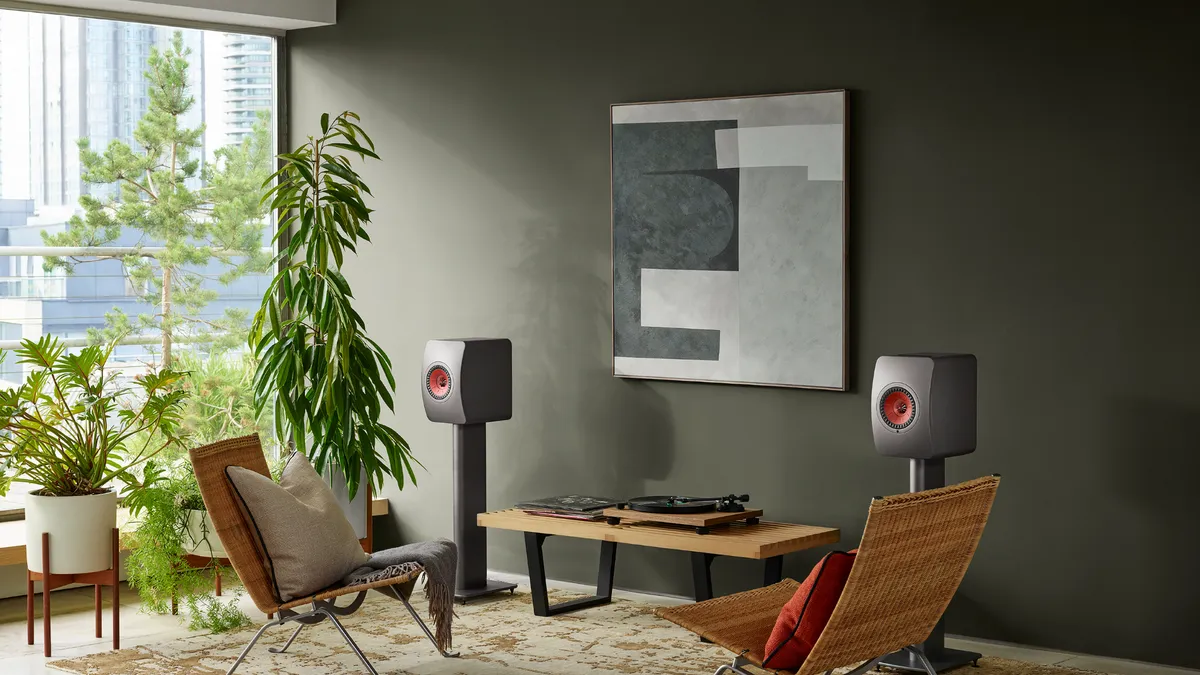


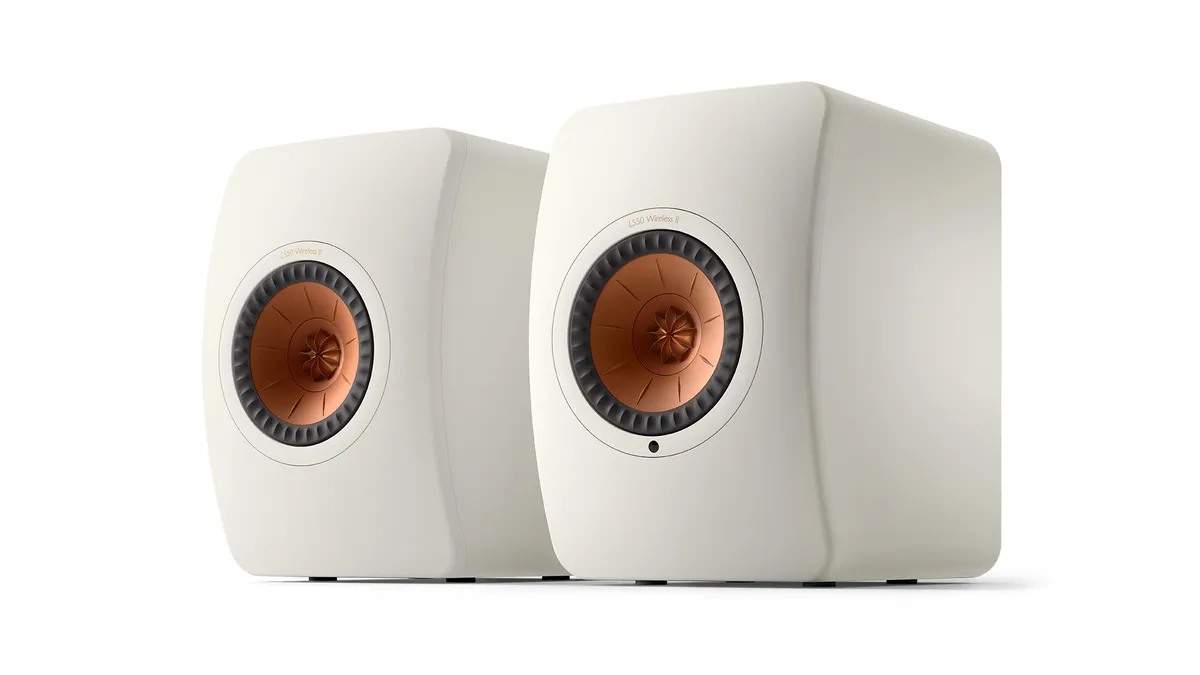


Premium versions of the LSX II LT above, KEF's sequel to its outstanding LS50 Wireless speakers improves on greatness – no easy feat, even for an audio brand as surefooted as KEF.
They sit below the very premium JBL 4329P as well as KEF's pricier LS60 Wireless offerings in the burgeoning market, in terms of both price and performance, but if the LS50 Wireless II suit your budget more, you won't be disappointed with this premium system.
Like their illustrious predecessors, the LS50 Wireless II serves as a superb all-in-one system (streaming and amplification are built-in) by dint of their advanced connectivity. Improvements include upgraded components and a new KEF Connect app where you can access the likes of Tidal, Qobuz, Amazon Music and Deezer. Not that you'll need to reach for any of the aforementioned apps; these speakers are capable of streaming via AirPlay 2, Google Chromecast and Bluetooth, and are also Roon Ready.
KEF's striking design is matched by stunning sonics, enhanced by refreshed Uni-Q drivers and KEF's all-new MAT absorption technology. The presentation is more refined and the addition of MAT can be heard in the treble and midrange, which our in-house experts described as "cleaner-cut".
Our LS50 Wireless II review reads: "The whole presentation has been opened out, that extra room not only filled with subtler, more precise detail, but also allowing for greater instrument separation."
Quite simply, if you're in the market for a high-fidelity all-in-one system packed with streaming smarts, this sophisticated sequel should top your list.
Read our full KEF LS50 Wireless II review
Best budget streaming amp


If you're looking to build a neat, versatile and streaming-savvy hi-fi system for around £500 / $500 / AU$1000, the WiiM Amp Pro isn't a bad foundation from which to start. (Nor are the Wharfedale Diamond 12.1 speakers terrible partners for it!)
This new streaming amplifier is the most affordable we can recommend of its kind, costing just £399 / $379 / AU$699, and it ticks a lot of boxes when it comes to connectivity, usability and performance.
You get a wealth of connectivity, both in terms of streaming and physical sockets, including Spotify Connect, Chromecast, Bluetooth and HDMI (albeit not AirPlay 2). And the app-controlled streaming platform is both smart and user-friendly.
Sound-wise, you get a clean, open and smooth presentation (not unlike the sonic character of the five-star WiiM Ultra streamer) that is easy to listen to. "Streamed songs [have] ample space to flourish, with voices projected clearly and in focus, and instruments working together to deliver an engaging, lively sound," we said in our review.
Compared to the WiiM Amp, there is more punch, snap and sparkle to the sound, as well as more in the way of detail and dynamic expression. Overall, it's a very pleasing streaming amplifier to listen to music through.
It isn't perfect, as the greyed-out fifth star suggests. Despite its modest price, we would still like a bit more rhythmic precision and texture. As our experts note in our review, "there are instances – in Dave Brubeck’s Take Five and Radiohead’s The National Anthem – where the Amp Pro gets a little confused with the complex rhythmic patterns and isn’t as musically cohesive as we’d like."
Still, for the money it gets more things right than most, and is therefore a compelling option at this sparse end of the market.
Got a bigger budget? If you want a step up in all-round sonic ability, then the more powerful WiiM Amp Ultra is worth considering for £499 / $529 / AU$899.
Read our full WiiM Amp Pro review
Best premium streaming amp


If you're seeking a remarkably adept hi-fi solution that offers a wide range of streaming smarts, and impressive amplification in a modern package, it's very hard to look past the newly Award-winning Arcam SA35.
The SA35 is actually Arcam's 'entry-level' streaming amplifier, costing a hefty £2999 / $3300 / AU$6495. That's still a reasonable chunk of cash to spend, so what are you getting for what is a not-inconsiderable financial outlay?
Well, aside from a beautifully made and handsomely finished product (we do like Arcam's signature blend of blacks and yellows), this is a seriously thorough spec sheet. Apple AirPlay, Google Cast, Spotify Connect, Tidal Connect, Qobuz Connect, Amazon Music and Roon are all here, and there’s also playback from UPnP servers and the system can handle a multitude of high-res formats up to 32-bit/384kHz PCM and DSD256.
There’s also two-way Bluetooth connectivity, which not only allows you to stream music to the system from a smartphone or tablet but also allows you to stream music from the Arcam to any pair of Bluetooth headphones you want to pair with the unit. If you want a standard headphone connection, a 3.5mm socket has you covered.
Connectivity also includes a pair of optical digital inputs, a pair of coaxial digital inputs (both styles of digital input support datastreams up to 24-bit/192kHz) and HDMI eARC for anyone wanting to use the Arcam to receive audio from a compatible TV.
The SA35 isn't all tricks and no trousers, either. 120W of Class G amplification per channel provides the muscle behind the music, and the result is a beautifully composed, controlled performance from Arcam's streaming amp that finally usurped the spot long held by Naim's Uniti Atom.
The Arcam is a deeply musical streaming amplifier, revealing both textural details while delivering all of the weight and emotional impact that only comes from a top-level performer. When the time comes to turn up the heat, the SA35 is more than capable of stretching to trickier fare, showcasing immense agility and confidence across a range of frequencies, from a well-controlled treble to its taut, nimble yet powerful lower end.
Our review summed it up nicely: "Where people want the convenience of a one-box solution but don’t want to make huge sacrifices where sound quality is concerned, the Arcam SA35 streaming amplifier is one of those rare do-it-all devices that does it all extremely well. Highly recommended".
Read our full Arcam SA35 review
Best all-in-one system


The single-box Ruark Audio R410 is a success, to a lesser or greater extent, in every respect. As an object, a piece of furniture, it’s gorgeous and, quite simply, brilliantly realised. As a flexible, function-rich piece of audio equipment, it is hard to find fault with (except for the absence of a dedicated control app).
In terms of the sound it makes, there’s an awful lot to like, not least its eloquent, direct and balanced presentation – and next-to-nothing to take issue with. While it may only be one box, "‘Room-filling’ is not too mild a description of its talents where out-and-out volume is concerned," notes our R410 review.
The R410 has more features than you'll probably need onboard – Bluetooth 5.1, wi-fi and UPnP, the ‘Connect’ versions of Spotify and Tidal, Apple AirPlay 2 and Chromecast. Ruark has a rich history with radios and so we can expect FM, DAB/DAB+ and internet radio to come as standard.
There’s an aerial to facilitate radio reception on the rear of the R410, and that’s also where you find all the physical connections, including an HDMI eARC input that makes the R410 TV-friendly too.
Overall it’s a fearsomely competitive product, and represents money well spent. Looking for this kind of style and substance in a more affordable package? The next-model-down Ruark Audio R2 Mk4 is another great-value, five-star radio streaming system.
Read our full Ruark Audio R410 review
Also consider
- Technics SA-C600: An Award-winning streaming amp with a CD player, this five-star Technics is a unique proposition today, but a hugely compelling one. Often available at a discount, it's great for those who value both streaming and physical disc playback in one sleek housing.
- WiiM Amp Ultra: A step up in price and performance from the WiiM Amp in the main list, the Amp Ultra is a solid option for a small ‘just add speaker’ solution. Easy to use, easy to accommodate and solid in its performance, it's a great way to start off a fledgling hi-fi setup.
- Naim Uniti Atom: Stylish? Yep. Sounds great? Yep. Versatile? Yep. The long-running premium Uniti Atom is a five-star operator, combining streaming smarts and amplification to stunning sonic effect, all while looking the business.
- Ruark Audio R610: The streaming amplifier category has exploded in recent years, and Ruark's one combines gorgeous retro looks with tactile control and a rich, dynamic sound. Make sure you partner the R610 with its matching Ruark Sabre-R speakers if you want to get the most out of what is an outstandingly musical performer.
- Focal Diva Utopia: If you have the cash and desire to go all-in on performance and convenience, this £29,999 / $39,999 / AU$59,999 luxury stereo streaming speaker system is well worth considering. It combines high-end performance with every feature you would need, and delivers a large-scaled, powerful sound.
- Roksan Attessa Streaming Amplifier: The Robocop-looking Roksan blends a friendly, easy-going presentation with an ample feature set and a stylish, simple to navigate design.
How to choose
Choose your style
So do you buy a microsystem? A just-add-speakers streaming amplifier? A vinyl system? Or a fully fledged stereo speaker system? It probably won't surprise you to read that your decision will likely come down to two things: what sources you use, and what budget you have.
If your budget is limited to hundreds as opposed to thousands, your best bet is to consider either a complete stereo speaker system like the KEFs and Triangle above, or an entry-level streaming amplifier like the Technics with a separate pair of stereo speakers. That'll ensure you have a complete music system in two or three boxes without breaking the four-figure barrier.
A bigger budget will open doors to better sound quality, and unless you are set on having everything within two cabinets, as the JBL system on this page offers, we'd recommend going down the streaming amplifier plus speakers route.
Consider what features you need
Spending more doesn't necessarily get you more features these days, mind you – a budget system is just as likely to tick as many boxes as one five times the price. What you should do, however, is ensure you buy one that covers the sources you need. For example, if you want to connect a turntable, ensure it has a phono stage (unless you're happy to buy an external one to connect via its RCA input).
Only want to play vinyl, easily and affordably? Just buy a turntable system like the Rega. And what if integrated CD playback is a priority? Make sure your system has a built-in disc drive, as the Technics above does. Make a list of your desirable features, and see which recommended systems with them fit your budget.
Equally, be wary of buying a system with more features than you need, as you could be paying for them! If you don't need network connectivity because you'll primarily be connecting a turntable or using Bluetooth, look into a pair of active speakers or an integrated amplifier with Bluetooth instead.
Budget for extras
Lastly, don't forget to budget for extras, such as speaker stands and, if you need them, speaker cables.
Recent updates
- February 2026: New entries on the main list include the NAD C 3050 (with MDC2 BluOS-D module) and the Arcam SA35, while older models have been removed, and we've marked the current What Hi-Fi? Award winners. The also consider list has also been updated with fresh models.
- April 2025: No product recommendation changes this time, although the new Cambridge Audio Evo One joins our Also Consider list as a recommendable all-in-one system.
- February 2025: We had high hopes that the new Technics SC-CX700 would give the KEF LS50 Wireless II below a run for its money, but it has proven disappointing, receiving only three stars. Meanwhile, the stupendously high-end Focal Diva Utopia makes our Also Consider list.
- December 2024: The newly crowned What Hi-Fi? Award winners have been labelled as such. Since our last update, we've reviewed and can recommend the Yamaha R-N800A but it doesn't make this definitive list.
- October 2024: No newcomers make the list this time, although we look forward to putting the newly announced Technics SC-CX700 speaker system against the class-leading KEF LS50 Wireless II shortly.
- July 2024: No new entries, with the recently reviewed Roksan Attessa Streaming Amplifier impressing but ultimately not enough to muscle in between the Technics and Naim network amps on this list.
- May 2024: No new entries, although the newly tested Audio Pro C20 all-in-one system has been added as an Also Consider for those looking for a mature one-box wireless speaker.
- March 2024: Swapped the KEF LSX II for the company's new, more affordable LSX II LT. We added an 'also consider' section to give readers more options, too.
How we test hi-fi systems
Here at What Hi-Fi? we review hundreds of products every year, including plenty of hi-fi systems, in our dedicated, state-of-the-art testing facilities, where our in-house experts carry out all of our testing.
Collectively, the What Hi-Fi? team has more than 150 years experience of in reviewing, testing and writing about consumer electronics. Our strict criteria and unique listening room environment give us complete control over the testing process, ensuring consistency and scrutiny within an industry-leading context of every core field in hi-fi.
All hi-fi systems are compared to best-in-class rivals in the same price category, so when a new one comes along it will be listened against the most similar What Hi-Fi? Award winner and/or five-star competitor in the field. As the hi-fi system is an eclectic category, if a product isn't an 'all-in-one' solution and instead requires partnering with other kit (as streaming amplifiers do, requiring speakers), we will test them with optimum price-comparable partnering equipment to ensure we are hearing them at their best and in a suitable, real-world setup.
All review verdicts are agreed upon by the team as a whole rather than a single reviewer, too, helping to avoid individual subjectivity. That's why our reviews are trusted by retailers, manufacturers and shoppers alike.
Every category of product we test has a Best Buy buying guide like this one, and only the top products feature in them. So if you take the plunge and buy one of the products recommended above, or on any other Best Buy page, you can rest assured you're getting a What Hi-Fi?-approved product.
You can read more about how we test and review products on What Hi-Fi? here.
MORE:
Need expert advice? Here's how to build the perfect hi-fi system
Splash out on today's best hi-fi deals
Our pick of the best hi-fi speakers for every budget
Today's best deals

