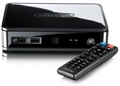

New from Dutch network brand Sitecom is the MD-273 Network TV Media Player, a compact device capable of playing 1080p Full HD video, most common media formats and content stored on USB memory devices.
Selling for £120, it can be controlled using the remote supplied, or using free apps now available for both iOS and Android devices.
Part of the company's Smart Living Line, the MD-273 has been designed, Sitecom says, 'from a non-technical perspective with the focus on the needs of end users'. That extends to black gloss casework, intuitive menus and a package including everything required to get the unit up and running, including both network and HDMI cables as well as composite video/stereo audio cabling for older TVs.

It will play popular audio formats including MP3, AC3, FLAC, WMA and stereo Dolby Digital and DTS; MPEG, MKV, XviD, DivX and AVI video; and JPEG, GIF, TIFF and PNG pictures.
The USB2.0 ports allow content to be accessed locally from USB storage, and will also accommodate a Wi-Fi adapter such as Sitecom's Wireless Media Adapter 300N.

The Media Remote App allows content to be accessed, and the player controlled with the familiar swipes, taps and so on, and also has a virtual keyboard to speed up searches. It even has a shuffle mode - shake the device and it will play a random song via the player, shake again and it goes on to the next random track.
Follow whathifi.com on Twitter
